Offline Server - SQL Debug

Yoh Asakura

New member
Messages
261
Points
0
Emulator
Hello,

It has been a long time I since I had my last server, and recently I would like to set up an offline server.
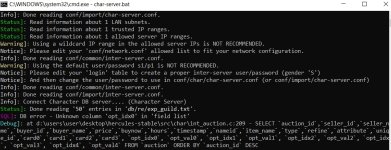
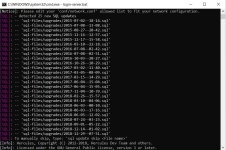
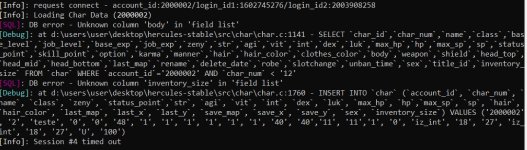
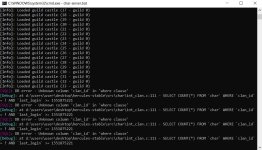
Short story, I followed AnnieRuru tutorial. I am being able to login with an account but not allowed to created characters, and I am also getting some errors.
Please check the attached photos.

Thanks in advance.


Spoiler


Spoiler


Spoiler
char-server.jpgchar-server2.jpglogin-server.jpg

birthdate.jpg

columns.jpg


Last edited by a moderator:
look like you using new server code and old database

see sql updates what server suggest to apply

 
look like you using new server code and old database

see sql updates what server suggest to apply
@update
Tried using a new client (2014) with a PACKETVER 20140305, but still getting the same error of "unsupported packet". And yes I edited mmo.h and recompiled. Then I searched here on hercules forum about this error and found this from you:

"in conf/map/battle/client.conf
change packet_obfuscation to 0."


it worked only with the new packetver 20140305, did not work for my 20140205 ...I believe it is because I have enabled packet encryption for my 20140205 hexed, so I tried to edit the src/map/packets.h but I've realized the latest hercules emulator does not have 20140205 packet version anymore...T_T

packet.png

 
Last edited by a moderator:
like 4144 said:

I had the same problem when trying to update my old emulator

I can only see the 2 images of your console which mention your database , the rest looks like a blank long cat

so from that i can also suggest you figure out how to update your sql :P

hers my client though, i never bother updating my emulator for 1.5 years now so ill happily give you mine if you want it

https://megaupload.nz/Idjec1T5m2/2015-10-29aRagexeRE_patched_exe

 
like 4144 said:

I had the same problem when trying to update my old emulator

I can only see the 2 images of your console which mention your database , the rest looks like a blank long cat

so from that i can also suggest you figure out how to update your sql :P

hers my client though, i never bother updating my emulator for 1.5 years now so ill happily give you mine if you want it

https://megaupload.nz/Idjec1T5m2/2015-10-29aRagexeRE_patched_exe
I appreciate the help, but I actually did not want to update any of my old server (2014 data client), my emulator is only til Hercules-12.sln, which means I can only compile using Visual Studio 2013 version, which I cannot find anymore and I think it's not even compatible with Windows 10. That's why I am using the latest emulator now, compiled with Visual Studio 2017.
I don't know why the latest hercules emulator does not support 20140205 packet version. I could not even find the packet keys on packets.h, I believe everything's changed...

 
Last edited by a moderator:
I appreciate the help, but I actually did not want to update any of my old server (2014 data client), my emulator is only til Hercules-12.sln, which means I can only compile using Visual Studio 2013 version, which I cannot find anymore and I think it's not even compatible with Windows 10. That's why I am using the latest emulator now, compiled with Visual Studio 2017.
I don't know why the latest hercules emulator does not support 20140205 packet version. I could not even find the packet keys on packets.h, I believe everything's changed...
yikes yeah sounds like a problem 

 
With packet error, look like encryption disabled in client. By default server enable encryption always.

Patch client without changing encryption or disable encryption in server configuration

 
With packet error, look like encryption disabled in client. By default server enable encryption always.

Patch client without changing encryption or disable encryption in server configuration
Thanks for the help. That solved the problem, but I also figured out a way to download VisualStudio 2013 and use it to compile my old emulator, it worked normally on W10.

 
Back
Top