Ragnarok Offline Newbie Pack 2022 | Make your RO server in less then 5 minutes

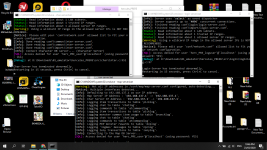
Now I have another problem after run run-server.bat

On Eng (from translate, I am rus) it looks like "char-server.bat not internal or external a command, executable program, or batch file"

How can I solve it? What way can I write?

View attachment 5708


Not sure how many of the steps you've done. Here is what worked for me.

Don't forget to rebuild the emulator files

Run: Map, Char, and Login Server, individually the first time. Make sure server is running and then "runserver" in the emulator. You may have to run as administrator to get it to run properly the first time. 
 
What maps are you talking about? 
Current maps missing mobs from this Hercules install package:
Episode 15.1 Fantasmagorika
"1@mcd",
    "ver_eju",
    "ver_tunn",
    "verus03",
    "verus04",

Tomb Of Honor
    "lhz_d_n2",
    "lhz_dun_n",

The Village of Lasagna
    "conch_in",
    "lasa_dun01",
    "lasa_dun02",
    "lasa_dun03",
    "lasa_dun_q",
    "lasa_fild01",
    "lasa_fild02",
    "lasa_in01",
    "lasagna",

 Rock Ridge
    "har_in01",
    "harboro1",
    "harboro2",
    "rockmi1",
    "rockmi2",
    "rockrdg1",
    "rockrdg2",

Illusion Of Turtle Island (Crashes client as well)
    "tur_d03_i",
    "tur_d04_i",

sp_rudus
sp_rudus2
sp_rudus3

vis_h01
vis_h02
vis_h03
vis_h04

ein_d02_i
com_d02_i

I found all these maps to be missing the appropriate mobs.

 
image.png

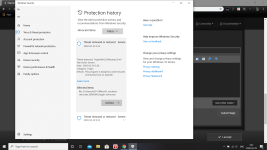
Why suddenly the login server detected as virus? please help

image.png

 
Last edited by a moderator:
Current maps missing mobs from this Hercules install package:
Episode 15.1 Fantasmagorika
"1@mcd",
    "ver_eju",
    "ver_tunn",
    "verus03",
    "verus04",

Tomb Of Honor
    "lhz_d_n2",
    "lhz_dun_n",

The Village of Lasagna
    "conch_in",
    "lasa_dun01",
    "lasa_dun02",
    "lasa_dun03",
    "lasa_dun_q",
    "lasa_fild01",
    "lasa_fild02",
    "lasa_in01",
    "lasagna",

 Rock Ridge
    "har_in01",
    "harboro1",
    "harboro2",
    "rockmi1",
    "rockmi2",
    "rockrdg1",
    "rockrdg2",

Illusion Of Turtle Island (Crashes client as well)
    "tur_d03_i",
    "tur_d04_i",

sp_rudus
sp_rudus2
sp_rudus3

vis_h01
vis_h02
vis_h03
vis_h04

ein_d02_i
com_d02_i

I found all these maps to be missing the appropriate mobs.
Can't find these maps on the .txt files that are needed for the monster to spawn. This hercules versions doesn't has them. Mobs spawn can be found at emulatorfolder\npc\re\mobs.  Just checked on github. They din't add spawn for these maps in the current stable version. 

 
Last edited by a moderator:
This is common problem, when you have pre-installed MySQL server on your system. Turn it off, or remove (uninstall) mysql-server that you have on your PC. 3306 Port usually used by pre-installed windows version of MySQL. The Offline pack contain all required servers and files for running the emulator. Optionally you can use Process Hacker tool to identify which app using 3306 port.

Hi Master @anacondaq,

I have already downloaded the recently updated 01 Emulator but the same problem still occurred. :(  

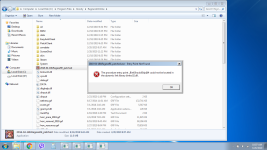
I'm starting to lose hope for me to fix this. I have tried to watch some tutorials on the youtube on how to fix the System Error

View attachment 5701
I don't really know why this happen. You can try to install this:

https://drive.google.com/drive/folders/1oR6LryiU-UX97Xrq2fnD7gNU1W_kcx7M (for x64 install x64 version, not both)

It might help, who knows.

Hi @Ejamestereo,

A work around for this is downloading the .dll files it asks at https://pt.dll-files.com/ and put the .dll files in the folder from the emulator. Trying to figure out how to apply the rebalance patchs from kRO in this emulator.
https://drive.google.com/drive/folders/1oR6LryiU-UX97Xrq2fnD7gNU1W_kcx7M better to use this.

How do you get all the missing monsters on the maps?


What maps are you talking about? 


Magma Dungeon 3 is empty, that was the last new map I checked before heading to work. Will check some more tonight.


Try to open run-server from administrator, it helped me on my win10


Now I have another problem after run run-server.bat

On Eng (from translate, I am rus) it looks like "char-server.bat not internal or external a command, executable program, or batch file"

How can I solve it? What way can I write?

View attachment 5708
In the background on your image I see that you have already running emulator. You can't make work 2 emulators on the same PC at the same time. (char, login, map servers).

Not sure how many of the steps you've done. Here is what worked for me.

Don't forget to rebuild the emulator files

Run: Map, Char, and Login Server, individually the first time. Make sure server is running and then "runserver" in the emulator. You may have to run as administrator to get it to run properly the first time. 

Current maps missing mobs from this Hercules install package:
Episode 15.1 Fantasmagorika
"1@mcd",
    "ver_eju",
    "ver_tunn",
    "verus03",
    "verus04",

Tomb Of Honor
    "lhz_d_n2",
    "lhz_dun_n",

The Village of Lasagna
    "conch_in",
    "lasa_dun01",
    "lasa_dun02",
    "lasa_dun03",
    "lasa_dun_q",
    "lasa_fild01",
    "lasa_fild02",
    "lasa_in01",
    "lasagna",

 Rock Ridge
    "har_in01",
    "harboro1",
    "harboro2",
    "rockmi1",
    "rockmi2",
    "rockrdg1",
    "rockrdg2",

Illusion Of Turtle Island (Crashes client as well)
    "tur_d03_i",
    "tur_d04_i",

sp_rudus
sp_rudus2
sp_rudus3

vis_h01
vis_h02
vis_h03
vis_h04

ein_d02_i
com_d02_i

I found all these maps to be missing the appropriate mobs.
Looks like these episodes are not fully implemented into the Hercules.

I do not know how to help here. Need to ask devs here on the forum about these missing features. As far as I remember the content mentioned by you already implemented, just need to properly port it to hercules.

View attachment 5715

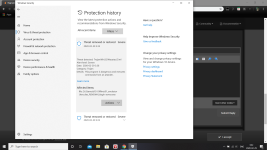
Why suddenly the login server detected as virus? please help

View attachment 5714
I don't know why this happen. I can confirm this. Only MS detect it, all others (60+ antiviruses) does not detect anything, because there is nothing to detect at all, it's open source. Everyone can try to re-compile it from source code and will get the same results. I have sent false positive report to microsoft, and re-created a new version of package with latest updates, but these files also detected. I hope in few days or weeks Microsoft will solve the problem.

Can't find these maps on the .txt files that are needed for the monster to spawn. This hercules versions doesn't has them. Mobs spawn can be found at emulatorfolder\npc\re\mobs.  Just checked on github. They din't add spawn for these maps in the current stable version. 
Sorry, looks like the content not implemented here, nothing to do with this. The only thing what we could do - ask someone who motivated and have skills to implement it for everyone on the board and push to the repo.

Update 07 March 2020.

Changelog:


Hi @anacondaq

Any way i can make my friends(local area) connect to my offline server? we have the same IP.

A tutorial would be much appreciated!

Thank you!

Update:

Nvm, I figured it out.

For those that want to have a LAN party with your friends follow these steps:

1. Download Hamachi( make your friends download it as well cause this will be the main network connectivity you will use)
 - Main User

 # Register An Account
 # Create New Network
 # Save your network's user and pass ( you will give this access to your friends so they can connect to your hamachi IP )
- Sub User

# Register An Account
# Join Network
# Get the Main network's user and pass and login through that
2. Get the IP provided by Hamachi
3. Replaced the IP defaults of the ff [conf] files:
 - char-server.conf

 - map-server.conf

 - network.conf(just add the hamachi IP provided)
ex. 
trusted: (
    "127.0.0.1:255.0.0.0:hamachi.ip.here",
)


4. find the "clientinfo.xml" file in your RO folder and change this "<address>127.0.0.1</address>" to the hamachi ip. note that if you find other grf's that has the same file, just do the same process as well.

5. Share your RO folder.

Main user is required to execute the ff:
1. Domain
2. run-server.bat

Sub users don't. So you can just send the client file even without the domain.

Hamachi only has a maximum of 5 users. if you want to extend the capacity you have to pay.


GOODLUCK!

 
Last edited by a moderator:
thanks a lot it works like a charm,

can someone teach me how to add COSTUME to the game, i want my "Corsair" changed to "Costume Corsair"

i try to read but i dont understand it, what is costume system.diff , and how to use it can someone help me?

 
Current Version: 07 March 2020
Hercules Hash: https://github.com/HerculesWS/Hercules/commit/9106bbab19b4feaa4623a3b8e5d59e08ef73b640

Download Links (~4GB):

Optional, full clean kRO game client (20190818): DOWNLOAD 2.9GB

Important: Please make someone mirror for these files. Or make a donation to me and I will make mirror by myself.
Hi Master @anacondaq,

Thank you for usual support on us, My Hercules Pack/Emulator is now working ^_^

May I ask if the current version is now supported Star Emperor and Soul Reaper Jobs?

 
@anacondaq well sir can you help me fix the asura strike on your pre renewal emulator? its not working, i try to ask on the forum but well just like your topic here "Newbie" we really dont understand coding i try to read and watch video but i really dont understand   :(  

trying to watch the tutorial on the video but its still not working :( :( :( :(

Capture.PNG

EDIT: DONE!!!!!!!!!!!!!!! YEAH!!!!!

 
Last edited by a moderator:
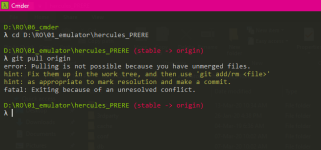
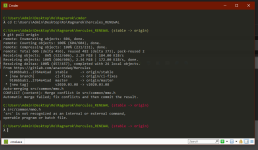
Hi! Please help im stuck in hours to figure it out this problem and dont have any exp in coding. I just want to play this game

All help was appreciate!!!

"CONFLICT (content): Merge conflict in src/common/mmo.h

 Automatic merge failed; fix conflicts and then commit the result."

1.PNG

 
Hi! Please help im stuck in hours to figure it out this problem and dont have any exp in coding. I just want to play this game

All help was appreciate!!!

"CONFLICT (content): Merge conflict in src/common/mmo.h

 Automatic merge failed; fix conflicts and then commit the result."

View attachment 5737


i dont know whats your problem but if our problem is the same maybe this will help im newbie too.

First you need tools like https://git-scm.com/downloads
and https://visualstudio.microsoft.com/vs/whatsnew/

Install it!

next..... right click your emulator directory (ex. hercules_RENEWAL)

and choose "Git Bash Here"

after that type "git clone https://github.com/HerculesWS/Hercules.git"

the cmd will download and load some file,

after that, go to emulator folder, open 

Hercules-14.sln

Hercules-15.sln

Hercules-16.sln

using visualstudio,, klik on Build bar on top, and choose build solution, DONE! :)

if you want to add some patch, just copy the .patch file to your emulator directory, right click on emulator folder, choose "Git Bash Here"

and type "git apply (yourpatchfilename).patch"

and repeat rebuild the Hercules(14/15/16).sln again

good luck :)

 
Last edited by a moderator:
thanks a lot it works like a charm,

can someone teach me how to add COSTUME to the game, i want my "Corsair" changed to "Costume Corsair" 

i try to read but i dont understand it, what is costume system.diff , and how to use it can someone help me?
GRF Editor. Install it. Select your GRF files, ItemInfo.lub files, where is your pre-re folder located, and try to use it, with GUI it's much easier to edit / add something new. Just need to try (always do backups first). Try to play with it. It's easy. Optionally you can try to use something like this:

https://herc.ws/wiki/Custom_Items

Hi Master @anacondaq,

Thank you for usual support on us, My Hercules Pack/Emulator is now working ^_^

May I ask if the current version is now supported Star Emperor and Soul Reaper Jobs?
As far as I know - nope yet.

@anacondaq well sir can you help me fix the asura strike on your pre renewal emulator? its not working, i try to ask on the forum but well just like your topic here "Newbie" we really dont understand coding i try to read and watch video but i really dont understand   :(  

trying to watch the tutorial on the video but its still not working :( :( :( :(

View attachment 5736

EDIT: DONE!!!!!!!!!!!!!!! YEAH!!!!!
No, it's not done. On your screenshot there is errors with applying the patch.

Most easier way to apply a patch - just open the patch with VSCode editor, it will highlite green text that need to paste, and red text that need to find in the file. Just use search feature in your text editor and replace. But there must be some understanding what are you doing and for what.

Better idea: tell me what do you want to do?

Hi! Please help im stuck in hours to figure it out this problem and dont have any exp in coding. I just want to play this game

All help was appreciate!!!

"CONFLICT (content): Merge conflict in src/common/mmo.h

 Automatic merge failed; fix conflicts and then commit the result."

View attachment 5737
answer above. Also, as far as I know - patches from different emulators not compatible. Also -> emulator source code changed frequently. And if you're for example found a patch on herc board below for example 2018 year, there are high chances that this patch require changes to make it work and make it compatible with the emulator current source code. (because code changes overtime).

i dont know whats your problem but if our problem is the same maybe this will help im newbie too.

First you need tools like https://git-scm.com/downloads
and https://visualstudio.microsoft.com/vs/whatsnew/

Install it!

next..... right click your emulator directory (ex. hercules_RENEWAL)

and choose "Git Bash Here"

after that type "git clone https://github.com/HerculesWS/Hercules.git"

the cmd will download and load some file,

after that, go to emulator folder, open 

Hercules-14.sln

Hercules-15.sln

Hercules-16.sln

using visualstudio,, klik on Build bar on top, and choose build solution, DONE! :)

if you want to add some patch, just copy the .patch file to your emulator directory, right click on emulator folder, choose "Git Bash Here"

and type "git apply (yourpatchfilename).patch"

and repeat rebuild the Hercules(14/15/16).sln again

good luck :)
Also, hercules has some benefits over rathena:


Not need to download and install 8GB of Visual Studio for re-compiling the emulator.

 
Last edited by a moderator:
anacondaq, I would love if you could include Ragnarok Zero in this pack as well ;o

Or refer to some guide that works for Zero? I've been struggling to get it working, despite trying to patch things with Nemo and setting the appropriate PACKETVER for zero in hercws.

 
Thanks very much!

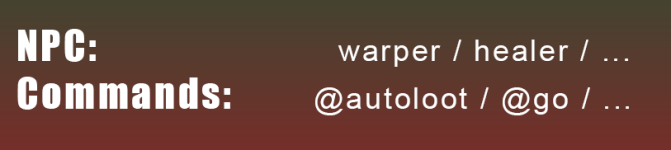
pls say, where can I find information about adding npc (healer/warper…) and commands for players (@autoloot/@go..)?
I cant find these topics on forum with search(

ragna1.PNG

 
Last edited by a moderator:
so in this Rag Exe. Guild emblem doesn't show ( or not implemented ) ? enlighten me.

 
you have outdated at least binkw32.dll, get newer version of it from any newer ro clients

 
Last edited by a moderator:
Back
Top