RO-Start (1.2) - Simple Launcher for Windows

Myzter

New member
Messages
13
Points
0
Age
52
Location
Third planet, third world.
Emulator
Hi,
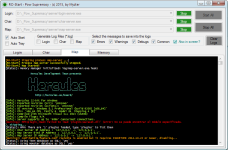
I want to share this ultra mega basic launcher for Hercules (Windows platforms), it's a simple launcher that Start (and Restart if fails) the three executables in hidden mode and show the server logs inside the launcher, requires .NET Framework 4.0+ to work.

Screen-shot:

RO-Launcher.png


How it works:

  • Copy "Ro-Start.exe" in the root of your server
  • Start the program and select the right EXEs
  • Press Start All (if you use Auto Tray the launcher will be minimized to the tray)
  • If you want to save logs into files, select the desired exe, a new file will be generated with the defined console messages. (ie: "server-rootmap [yyyymmdd].log").
  • "Also in Screen" allow to apply filter in the launcher logs (useful if you need only errors or warnings in the screen).
  • The logs in the application will be pruned at 2000 lines
  • When you close the launcher, all server EXEs will stop automatically.
  • Colors were added to better distinguish the different types of messages
  • To start the EXEs automatically when the launcher start check the Auto Start checkbox.

RO-Start.rar
Alternate Mirror: http://myzter.com/downloads/RO-Start.rar

Changes:

  • 2014-05-11: Way to detect exes in memory fixed, now recognize exes in the same directory, and ignore other exes running from other servers in the same machine.
  • 2014-05-12: Added support for log files and filters (suggested by Litro)
  • 2014-05-14: New mechanics to stop on fails, added colors and screen filters.
  • 2015-01-13: Added Auto Tray and Auto Start, the launcher show the server name in the window title and in the tray.
  • 2015-01-18: Fixed a bug in minimizing the window
  • 2015-04-19: Fixed missing messages from the log window (errors & some warnings...), fixed the text colors when the console text is too large and fixed the flickers in the text
  • 2015-05-15: Fixed encoding in logs. Added memory section and priority configuration for each exe.

Enjoy,
Myzter

RO-Launcher.png


Attachments

Last edited by a moderator:
does the console command of Herc also work with this launcher?

default_ani_meow.gif
 Mmm, at this time the launcher only captures de output, all the Herc exes support input commands?

It dosn't work for me show the erro msg 'Not a valid Win32 application'
Sorry, I'll compile a new version for 32 bits operating systems, the current one support 64 bits.

The compilation currently support both platforms... are you sure you installed .NET Framework 4?

 
Last edited by a moderator:
does the console command of Herc also work with this launcher?

default_ani_meow.gif
 Mmm, at this time the launcher only captures de output, all the Herc exes support input commands?

>It dosn't work for me show the erro msg 'Not a valid Win32 application'
Sorry, I'll compile a new version for 32 bits operating systems, the current one support 64 bits.

The compilation currently support both platforms... are you sure you installed .NET Framework 4?
win32  test ok  , work for me now  thx

 
it would be nice ih its can record warning, debug, and other notice that can be configured, what to log

well the option is present in conf each exes but im never found that log.txt

 
it would be nice ih its can record warning, debug, and other notice that can be configured, what to log

well the option is present in conf each exes but im never found that log.txt
The simple way is store all the output into files, other way is using RegEx to filter and store only the required messages, ie: Error, Warning, Debug, Common.

I'll give a look to this.
default_wink.png


It's done, now you can choose what logs create and the filters.

Thanks.

 
Last edited by a moderator:
it would be nice ih its can record warning, debug, and other notice that can be configured, what to log

well the option is present in conf each exes but im never found that log.txt
The simple way is store all the output into files, other way is using RegEx to filter and store only the required messages, ie: Error, Warning, Debug, Common.

I'll give a look to this.
default_wink.png


It's done, now you can choose what logs create and the filters.

Thanks.
thanks Myzter, it will be great help since alll admin can't watch their server all time, it will be help to look if ther is a error or such is log-ed

sorry its not logged all error from time we start the program untill we close its ? mmh what im try to say is

if i have star turn on my server on 01.00 and im back to check my server on 21.00 if there is a log we chose it is will be like this ??

04.00.48 [Error] .....

04.07.23 [Warning] ....

and so on ??

 
Last edited by a moderator:
The logs are generated in the root of your server (files .log) but the interface is still showing all the logs. I will add a new option to reflect the filters in the screen,
default_wink.png


Now the launcher allow to filter in screen and other stuff, like Colors.

 
Last edited by a moderator:
Hmm it would be much better if you could make it autostart. for example I like the native runserver.bat because I can simply put shortcut into startup and everytime I restart PC, the server will automatically start too. Also can you add sql backup function like the other old Server Launcher? 

 
Last edited by a moderator:
the font in the console can you make it look a like a command promt on windows, start-ro.exe have a bit little smaller font

 
Got an Unhandled exception error while minimizing:

See the end of this message for details on invoking
just-in-time (JIT) debugging instead of this dialog box.

************** Exception Text **************
System.ArgumentException: Balloon tip text must have a non-empty value.
at System.Windows.Forms.NotifyIcon.ShowBalloonTip(Int32 timeout, String tipTitle, String tipText, ToolTipIcon tipIcon)
at System.Windows.Forms.NotifyIcon.ShowBalloonTip(Int32 timeout)
at System.Windows.Forms.Form.OnResize(EventArgs e)
at System.Windows.Forms.Control.OnSizeChanged(EventArgs e)
at System.Windows.Forms.Control.UpdateBounds(Int32 x, Int32 y, Int32 width, Int32 height, Int32 clientWidth, Int32 clientHeight)
at System.Windows.Forms.Control.UpdateBounds()
at System.Windows.Forms.Control.WndProc(Message& m)
at System.Windows.Forms.Form.WndProc(Message& m)
at System.Windows.Forms.NativeWindow.Callback(IntPtr hWnd, Int32 msg, IntPtr wparam, IntPtr lparam)


************** Loaded Assemblies **************
mscorlib
  Assembly Version: 4.0.0.0
  Win32 Version: 4.0.30319.18444 built by: FX451RTMGDR
  CodeBase: file:///C:/Windows/Microsoft.NET/Framework64/v4.0.30319/mscorlib.dll
----------------------------------------
RO-Start
  Assembly Version: 1.0.0.0
  Win32 Version: 1.0.0.0
  CodeBase: file:///C:/lastRO/15-3athena/RO-Start.exe
----------------------------------------
System.Windows.Forms
  Assembly Version: 4.0.0.0
  Win32 Version: 4.0.30319.18408 built by: FX451RTMGREL
  CodeBase: file:///C:/Windows/Microsoft.Net/assembly/GAC_MSIL/System.Windows.Forms/v4.0_4.0.0.0__b77a5c561934e089/System.Windows.Forms.dll
----------------------------------------
System.Drawing
  Assembly Version: 4.0.0.0
  Win32 Version: 4.0.30319.18408 built by: FX451RTMGREL
  CodeBase: file:///C:/Windows/Microsoft.Net/assembly/GAC_MSIL/System.Drawing/v4.0_4.0.0.0__b03f5f7f11d50a3a/System.Drawing.dll
----------------------------------------
System
  Assembly Version: 4.0.0.0
  Win32 Version: 4.0.30319.34238 built by: FX452RTMGDR
  CodeBase: file:///C:/Windows/Microsoft.Net/assembly/GAC_MSIL/System/v4.0_4.0.0.0__b77a5c561934e089/System.dll
----------------------------------------
System.Xml
  Assembly Version: 4.0.0.0
  Win32 Version: 4.0.30319.34234 built by: FX452RTMGDR
  CodeBase: file:///C:/Windows/Microsoft.Net/assembly/GAC_MSIL/System.Xml/v4.0_4.0.0.0__b77a5c561934e089/System.Xml.dll
----------------------------------------
System.Core
  Assembly Version: 4.0.0.0
  Win32 Version: 4.0.30319.18408 built by: FX451RTMGREL
  CodeBase: file:///C:/Windows/Microsoft.Net/assembly/GAC_MSIL/System.Core/v4.0_4.0.0.0__b77a5c561934e089/System.Core.dll
----------------------------------------

************** JIT Debugging **************
To enable just-in-time (JIT) debugging, the .config file for this
application or computer (machine.config) must have the
jitDebugging value set in the system.windows.forms section.
The application must also be compiled with debugging
enabled.

For example:

<configuration>
  <system.windows.forms jitDebugging="true" />
</configuration>

When JIT debugging is enabled, any unhandled exception
will be sent to the JIT debugger registered on the computer
rather than be handled by this dialog box.
 
Got an Unhandled exception error while minimizing:

See the end of this message for details on invoking

just-in-time (JIT) debugging instead of this dialog box.

************** Exception Text **************

System.ArgumentException: Balloon tip text must have a non-empty value.

at System.Windows.Forms.NotifyIcon.ShowBalloonTip(Int32 timeout, String tipTitle, String tipText, ToolTipIcon tipIcon)

at System.Windows.Forms.NotifyIcon.ShowBalloonTip(Int32 timeout)

at System.Windows.Forms.Form.OnResize(EventArgs e)

at System.Windows.Forms.Control.OnSizeChanged(EventArgs e)

at System.Windows.Forms.Control.UpdateBounds(Int32 x, Int32 y, Int32 width, Int32 height, Int32 clientWidth, Int32 clientHeight)

at System.Windows.Forms.Control.UpdateBounds()

at System.Windows.Forms.Control.WndProc(Message& m)

at System.Windows.Forms.Form.WndProc(Message& m)

at System.Windows.Forms.NativeWindow.Callback(IntPtr hWnd, Int32 msg, IntPtr wparam, IntPtr lparam)

************** Loaded Assemblies **************

mscorlib

  Assembly Version: 4.0.0.0

  Win32 Version: 4.0.30319.18444 built by: FX451RTMGDR

  CodeBase: file:///C:/Windows/Microsoft.NET/Framework64/v4.0.30319/mscorlib.dll

----------------------------------------

RO-Start

  Assembly Version: 1.0.0.0

  Win32 Version: 1.0.0.0

  CodeBase: file:///C:/lastRO/15-3athena/RO-Start.exe

----------------------------------------

System.Windows.Forms

  Assembly Version: 4.0.0.0

  Win32 Version: 4.0.30319.18408 built by: FX451RTMGREL

  CodeBase: file:///C:/Windows/Microsoft.Net/assembly/GAC_MSIL/System.Windows.Forms/v4.0_4.0.0.0__b77a5c561934e089/System.Windows.Forms.dll

----------------------------------------

System.Drawing

  Assembly Version: 4.0.0.0

  Win32 Version: 4.0.30319.18408 built by: FX451RTMGREL

  CodeBase: file:///C:/Windows/Microsoft.Net/assembly/GAC_MSIL/System.Drawing/v4.0_4.0.0.0__b03f5f7f11d50a3a/System.Drawing.dll

----------------------------------------

System

  Assembly Version: 4.0.0.0

  Win32 Version: 4.0.30319.34238 built by: FX452RTMGDR

  CodeBase: file:///C:/Windows/Microsoft.Net/assembly/GAC_MSIL/System/v4.0_4.0.0.0__b77a5c561934e089/System.dll

----------------------------------------

System.Xml

  Assembly Version: 4.0.0.0

  Win32 Version: 4.0.30319.34234 built by: FX452RTMGDR

  CodeBase: file:///C:/Windows/Microsoft.Net/assembly/GAC_MSIL/System.Xml/v4.0_4.0.0.0__b77a5c561934e089/System.Xml.dll

----------------------------------------

System.Core

  Assembly Version: 4.0.0.0

  Win32 Version: 4.0.30319.18408 built by: FX451RTMGREL

  CodeBase: file:///C:/Windows/Microsoft.Net/assembly/GAC_MSIL/System.Core/v4.0_4.0.0.0__b77a5c561934e089/System.Core.dll

----------------------------------------

************** JIT Debugging **************

To enable just-in-time (JIT) debugging, the .config file for this

application or computer (machine.config) must have the

jitDebugging value set in the system.windows.forms section.

The application must also be compiled with debugging

enabled.

For example:

<configuration>

  <system.windows.forms jitDebugging="true" />

</configuration>

When JIT debugging is enabled, any unhandled exception

will be sent to the JIT debugger registered on the computer

rather than be handled by this dialog box.
Fixed, thanks!

 
Back
Top