

Naruto
New member
- Messages
- 174
- Points
- 0
Hi so Ive been working on making a universal skill for some unts....
In our database we have this section under a few skills who use the unt system ;
Unit: {
Id: 0x86
Layout: 3
Interval: 100
Target: "Enemy"
}
However we only have the option of giving a flag to the Id, unlike range and layout who can be seperated like so :
Unit: {
Id: 0xbb
Layout: {
Lv1: 1
Lv2: 1
Lv3: 1
Lv4: 2
Lv5: 2
Lv6: 2
Lv7: 3
Lv8: 3
Lv9: 3
Lv10: 4
}
Interval: -1
Target: "All"
Flag: {
UF_PATHCHECK: true
}
}
Adding a skill level modifier is possible, but heres something we can all do:
Take a look at the use of flag
Unit: {
Id: [ 0x86, 0xf4 ]
Layout: 3
Interval: 100
Target: "Enemy"
}
Alone it will have no effect on your skill and just serves its own purpose with whatever its told to do in the src.. ( Might wanna look at the skill). . .
So warp portal uses 2 effects, the pulse then the stand still which are 2 different unts
case UNT_WARP_ACTIVE:
// warp portal opens (morph to a UNT_WARP_WAITING cell)
group->unit_id = skill->get_unit_id(group->skill_id, 1); // UNT_WARP_WAITING
clif->changelook(&su->bl, LOOK_BASE, group->unit_id);
// restart timers
group->limit = skill->get_time(group->skill_id,group->skill_lv);
su->limit = skill->get_time(group->skill_id,group->skill_lv);
// apply effect to all units standing on it
map->foreachincell(skill->unit_effect,su->bl.m,su->bl.x,su->bl.y,group->bl_flag,&su->bl,timer->gettick(),1);
break;
this is the transition
group->unit_id = skill->get_unit_id(group->skill_id, 1); // UNT_WARP_WAITING
clif->changelook(&su->bl, LOOK_BASE, group->unit_id);
So you could do this :
group->unit_id = skill->get_unit_id(GS_DESPERADO, 1);
looking at GS_DESPERADO in my db
Unit: {
Id: [ 0x86, 0xf4 ]
Layout: 3
Interval: 100
Target: "Enemy"
}
I added the flag for some black fire i dont know
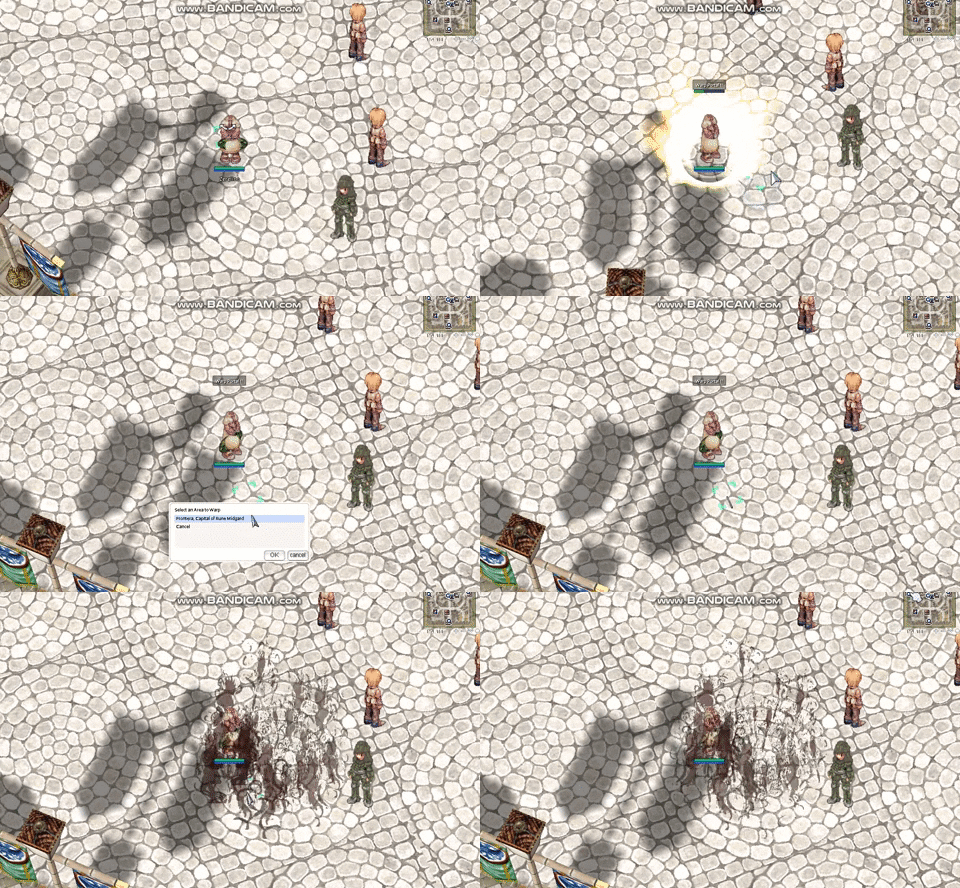
So my use is to have a reusuable skill.... a throwing animation that lays down whatever effect i want it too
however being reduced to 1 flag i can only attach one to the base throwing animation...
so by making new skills , or just adding them next to skills that wont bother you,
you can potentially change your skill effects however you want....
And the timer is like so :
limit = skill->get_time(skill_id,skill_lv);
so back check for flag....
So this is how we do it the normal way :
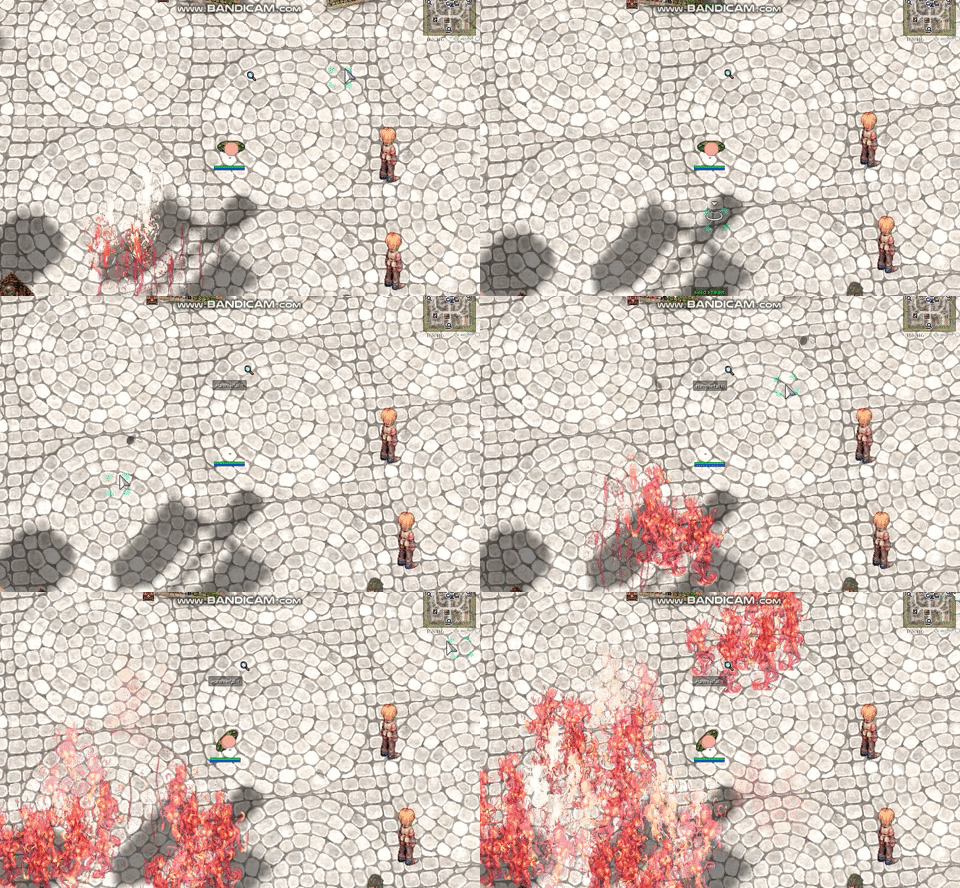
skill.c
add your new one :
case MG_FIREWALL:
if(sc && sc->data[SC_VIOLENTGALE])
limit = limit*3/2;
val2=4+skill_lv;
break;
case BS_HAMMERFALL:
if(!(flag&1))
limit=2000;
break;
Im using bs_hammerfall in this case
limit is the timer to change
I gave it its own space for testing... but add it to ground skills
case BS_HAMMERFALL:
skill->unitsetting(src,skill_id,skill_lv,x,y,0);
break;
case WZ_ICEWALL:
flag |= 1;
if( skill->unitsetting(src,skill_id,skill_lv,x,y,0) )
map->list[src->m].setcell(src->m, x, y, CELL_NOICEWALL, true);
break;
and finally the unt I attached to it from the skill_db
{
Id: 110
Name: "BS_HAMMERFALL"
Description: "Hammer Fall"
MaxLevel: 5
Range: -9
Hit: "BDT_SKILL"
SkillType: {
Place: true
}
SkillInfo: {
IgnoreLandProtector: true
AllowReproduce: true
}
AttackType: "Weapon"
Element: "Ele_Weapon"
KnockBackTiles: 2
SkillData1: 6000
SkillData1: 2000
CoolDown: 0
Requirements: {
SPCost: 15
}
Unit: {
Id: 0x10a
Range: 2
Layout: 3
Interval: 100
Target: "Enemy"
Flag: {
UF_SKILL: true
}
}
},
I made this one
Id: 0x10a
back in skill.c
case UNT_MOLOTOV:
group->unit_id = skill->get_unit_id(GS_DESPERADO, 1);
clif->changelook(&su->bl, LOOK_BASE, group->unit_id);
group->limit = skill->get_time(group->skill_id,group->skill_lv);
su->limit = skill->get_time(group->skill_id,group->skill_lv);
map->foreachincell(skill->unit_effect,su->bl.m,su->bl.x,su->bl.y,group->bl_flag,&su->bl,timer->gettick(),1);
break;
this is dirty but working, need to clean it up but im going to bed now o/
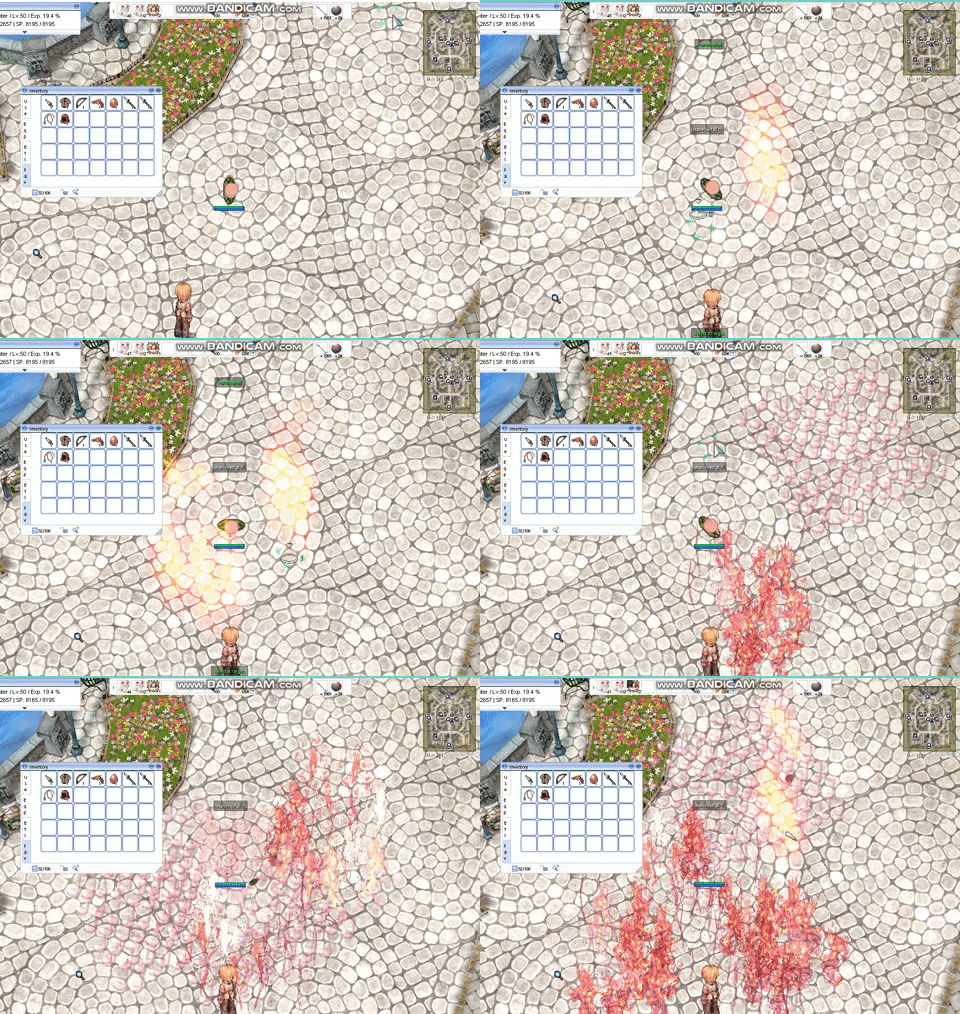
last thing I seperated them like this so i can reuse the same skill effect i use for throwing in a place skill :
Earlier i said we seperated the groud placement, well lets go do this to it
case BS_HAMMERFALL:
if (pc->checkskill(sd, BS_HAMMERFALL) == 1)
skill->unitsetting(src,skill_id,skill_lv,x,y,0);
if (pc->checkskill(sd, BS_HAMMERFALL) == 2)
skill->unitsetting(src,MG_FIREWALL,skill_lv,x,y,0);
break;
In our database we have this section under a few skills who use the unt system ;
Unit: {
Id: 0x86
Layout: 3
Interval: 100
Target: "Enemy"
}
However we only have the option of giving a flag to the Id, unlike range and layout who can be seperated like so :
Unit: {
Id: 0xbb
Layout: {
Lv1: 1
Lv2: 1
Lv3: 1
Lv4: 2
Lv5: 2
Lv6: 2
Lv7: 3
Lv8: 3
Lv9: 3
Lv10: 4
}
Interval: -1
Target: "All"
Flag: {
UF_PATHCHECK: true
}
}
Adding a skill level modifier is possible, but heres something we can all do:
Take a look at the use of flag
Unit: {
Id: [ 0x86, 0xf4 ]
Layout: 3
Interval: 100
Target: "Enemy"
}
Alone it will have no effect on your skill and just serves its own purpose with whatever its told to do in the src.. ( Might wanna look at the skill). . .
So warp portal uses 2 effects, the pulse then the stand still which are 2 different unts
case UNT_WARP_ACTIVE:
// warp portal opens (morph to a UNT_WARP_WAITING cell)
group->unit_id = skill->get_unit_id(group->skill_id, 1); // UNT_WARP_WAITING
clif->changelook(&su->bl, LOOK_BASE, group->unit_id);
// restart timers
group->limit = skill->get_time(group->skill_id,group->skill_lv);
su->limit = skill->get_time(group->skill_id,group->skill_lv);
// apply effect to all units standing on it
map->foreachincell(skill->unit_effect,su->bl.m,su->bl.x,su->bl.y,group->bl_flag,&su->bl,timer->gettick(),1);
break;
this is the transition
group->unit_id = skill->get_unit_id(group->skill_id, 1); // UNT_WARP_WAITING
clif->changelook(&su->bl, LOOK_BASE, group->unit_id);
So you could do this :
group->unit_id = skill->get_unit_id(GS_DESPERADO, 1);
looking at GS_DESPERADO in my db
Unit: {
Id: [ 0x86, 0xf4 ]
Layout: 3
Interval: 100
Target: "Enemy"
}
I added the flag for some black fire i dont know
So my use is to have a reusuable skill.... a throwing animation that lays down whatever effect i want it too
however being reduced to 1 flag i can only attach one to the base throwing animation...
so by making new skills , or just adding them next to skills that wont bother you,
you can potentially change your skill effects however you want....
And the timer is like so :
limit = skill->get_time(skill_id,skill_lv);
Code:
case AL_WARP:
			val1=skill_lv+6;
			if(!(flag&1)) {
				limit=2000;
			} else { // previous implementation (not used anymore)
				//Warp Portal morphing to active mode, extract relevant data from src. [Skotlex]
				struct skill_unit *su = BL_CAST(BL_SKILL, src);
				if (su == NULL)
					return NULL;
				group = su->group;
				src = map->id2bl(group->src_id);
				if (src == NULL)
					return NULL;
				val2 = group->val2; //Copy the (x,y) position you warp to
				val3 = group->val3; //as well as the mapindex to warp to.
			}
			break;
so back check for flag....
* flag&1 is used to determine when the skill 'morphs' (Warp portal becomes active, or Fire Pillar becomes active)
So this is how we do it the normal way :
skill.c
add your new one :
case MG_FIREWALL:
if(sc && sc->data[SC_VIOLENTGALE])
limit = limit*3/2;
val2=4+skill_lv;
break;
case BS_HAMMERFALL:
if(!(flag&1))
limit=2000;
break;
Im using bs_hammerfall in this case
limit is the timer to change
I gave it its own space for testing... but add it to ground skills
case BS_HAMMERFALL:
skill->unitsetting(src,skill_id,skill_lv,x,y,0);
break;
case WZ_ICEWALL:
flag |= 1;
if( skill->unitsetting(src,skill_id,skill_lv,x,y,0) )
map->list[src->m].setcell(src->m, x, y, CELL_NOICEWALL, true);
break;
and finally the unt I attached to it from the skill_db
{
Id: 110
Name: "BS_HAMMERFALL"
Description: "Hammer Fall"
MaxLevel: 5
Range: -9
Hit: "BDT_SKILL"
SkillType: {
Place: true
}
SkillInfo: {
IgnoreLandProtector: true
AllowReproduce: true
}
AttackType: "Weapon"
Element: "Ele_Weapon"
KnockBackTiles: 2
SkillData1: 6000
SkillData1: 2000
CoolDown: 0
Requirements: {
SPCost: 15
}
Unit: {
Id: 0x10a
Range: 2
Layout: 3
Interval: 100
Target: "Enemy"
Flag: {
UF_SKILL: true
}
}
},
I made this one
Id: 0x10a
back in skill.c
case UNT_MOLOTOV:
group->unit_id = skill->get_unit_id(GS_DESPERADO, 1);
clif->changelook(&su->bl, LOOK_BASE, group->unit_id);
group->limit = skill->get_time(group->skill_id,group->skill_lv);
su->limit = skill->get_time(group->skill_id,group->skill_lv);
map->foreachincell(skill->unit_effect,su->bl.m,su->bl.x,su->bl.y,group->bl_flag,&su->bl,timer->gettick(),1);
break;
this is dirty but working, need to clean it up but im going to bed now o/
last thing I seperated them like this so i can reuse the same skill effect i use for throwing in a place skill :
Earlier i said we seperated the groud placement, well lets go do this to it
case BS_HAMMERFALL:
if (pc->checkskill(sd, BS_HAMMERFALL) == 1)
skill->unitsetting(src,skill_id,skill_lv,x,y,0);
if (pc->checkskill(sd, BS_HAMMERFALL) == 2)
skill->unitsetting(src,MG_FIREWALL,skill_lv,x,y,0);
break;
Last edited by a moderator:
