
Hey I've put Angel Wings ingame (after many problems
 ) and wanted to do the same with Luffy Hat(the strawhat)
I've done it the same way as the Angel wings but the Sprites don't appear
made a Screen where you see the name of the sprites
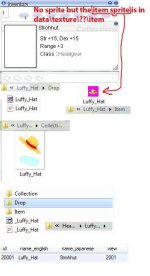
On the second screen you can see that I tryed to make more customs.. tryed -.-
iteminfo.lub:
[20001] = { unidentifiedDisplayName = "Hut", unidentifiedResourceName = "Luffy_Hat", unidentifiedDescriptionName = { "Hut", }, identifiedDisplayName = "Strohhut", identifiedResourceName = "Luffy_Hat", identifiedDescriptionName = { "Str +15, Dex +15", "Range +3", "Class : ^777777Headgear^000000", }, slotCount = 4, ClassNum = 2001 }
accname.lub:
[ACCESSORY_IDs.ACCESSORY_STROHHUT] = "_Luffy_Hat",
accname_eng.lub:
[ACCESSORY_IDs.ACCESSORY_STROHHUT] = "_Luffy_Hat",
accessoryid.lub:
ACCESSORY_STROHHUT = 2001
by the way sorry for that many questions haha
 doing it the first time
hope someone got that problems and know how to solve it !
It's every Custom Headgear I add..
shouldn't I write it direcly to those .lub files?
Edit: after I klick right of left on the items my client hang and I have to shut it down
I've done it the same way as the Angel wings but the Sprites don't appear
made a Screen where you see the name of the sprites
On the second screen you can see that I tryed to make more customs.. tryed -.-
iteminfo.lub:
[20001] = { unidentifiedDisplayName = "Hut", unidentifiedResourceName = "Luffy_Hat", unidentifiedDescriptionName = { "Hut", }, identifiedDisplayName = "Strohhut", identifiedResourceName = "Luffy_Hat", identifiedDescriptionName = { "Str +15, Dex +15", "Range +3", "Class : ^777777Headgear^000000", }, slotCount = 4, ClassNum = 2001 }
accname.lub:
[ACCESSORY_IDs.ACCESSORY_STROHHUT] = "_Luffy_Hat",
accname_eng.lub:
[ACCESSORY_IDs.ACCESSORY_STROHHUT] = "_Luffy_Hat",
accessoryid.lub:
ACCESSORY_STROHHUT = 2001
by the way sorry for that many questions haha
hope someone got that problems and know how to solve it !
It's every Custom Headgear I add..
shouldn't I write it direcly to those .lub files?
Edit: after I klick right of left on the items my client hang and I have to shut it down
Last edited by a moderator:


