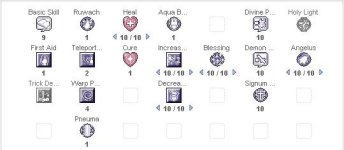
Teleport skill stuck on level 2

Adam

New member
Messages
66
Points
0
Github
Adam
Emulator
Hey everyone,

I want aco classes to be able to teleport around as easy as using a flywing then that is my setup:

// Allows players to skip menu when casting Teleport level 1
// Menu contains two options. "Random" and "Cancel"
skip_teleport_lv1_menu: yes

But they can't benefit this configuration tho because the "teleport" in the skill tree can't be modified and adjust to 1 or 2 at will (like Agi UP for instance)

Did I miss anything there ? Thanks for your help.
TLP.jpg

 
Last edited by a moderator:
you should edit the skill in lua files.

 
navigate to directory ro-rootdataluafiles514lua filesskillinfoz

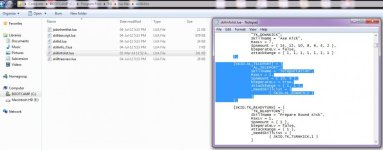
open skillinfolist and find SKID.AL_TELEPORT then modify it's bSeperateLv to ture

done

 
Last edited by a moderator:
Thanks for the help Angelmelody,

I've changed the .txt file as indicated, still the skill's level can't be modified, do you have any suggestion ?

[sKID.AL_TELEPORT] = {
"AL_TELEPORT";
SkillName = "Teleportation",
MaxLv = 2,
SpAmount = { 10, 9 },
bSeperateLv = true,
AttackRange = { 1, 1 },
_NeedSkillList = {
{ SKID.AL_RUWACH,1 }
}
},
 
Hm, well that's how my folder looks like.

Let me know if something is wrong please.

Luas.jpg

 
Thanks, I'm changing the folders accordingly and come back at you /no1

 
Works very nice now, thanks for your help Angelmelody
default_smile.png


If you are using 20120410 or greater client, then file location should be data/luafiles514/lua files/skillinfoz/

Be sure to repack it into GRF.

Also make sure your client reads lua files first(as I see, all files in ur dir is .lua) or if it reads .lub first, compile .lua to .lub, or just rename it.

Edit: Seems like topic already solved , and my reply coming late due to hell slow internet for me,

 
Last edited by a moderator:
If you are using 20120410 or greater client, then file location should be data/luafiles514/lua files/skillinfoz/

Be sure to repack it into GRF.

Also make sure your client reads lua files first(as I see, all files in ur dir is .lua) or if it reads .lub first, compile .lua to .lub, or just rename it.

Edit: Seems like topic already solved , and my reply coming late due to hell slow internet for me,
Well thanks anyways for trying /no1

 
Back
Top