Server Database Editor

It's working perfectly now, thank you!

EDIT: Actually, I'm trying to add more items now and they're still not being added on the accname or accessoryid.lua

At some point it did actually add 1 item on the accname only, nothing on the other file but I can't make it do it again. It's not even modifying the files when I save.

It's working on all the txt files for displayname, desc and resname, they're edited correctly.
You can't set the accessory lua files without using the "manage view id automatically" option. The table associations get broken otherwise.

Edit : I could add a way to edit the lua files directly from the interface however, but you'd still have to enter them manually.

I can't download the 1.0.9.4 
default_unsure.png
 

The link is down?
The links are back up (except for the main page's description). The link on mediafire changed for some reason, this usually doesn't happen!

Found something else, it seems hercules is not recognizing state and target as numbers and I can't find these manually in the file since it doesn't say which line it is...
Alright, tested it with a server and it's indeed causing issues. Use the previous trick I mentionned before, to forcibly rewrite the entire tables.

Select all items in the list (Ctrl-A), copy them in a text format (Ctrl-C) and paste them (Ctrl-V). You can achieve the same from Edit > Add item from raw db lines, and copy your mob_skill_db.txt. Only do this after loading the tables (Edit > Reload databases).

 
Last edited by a moderator:
You can't set the accessory lua files without using the "manage view id automatically" option. The table associations get broken otherwise.

Edit : I could add a way to edit the lua files directly from the interface however, but you'd still have to enter them manually.
If you can do it, please. It'd help a lot.

Okay, I think I found a bug, whenever I create a new item on the item_db2 tab and save, I check the txt it's created fine, then I add the item on the Client Item tab and when I save the item disappears from the item_db2 file although it still appears on the item2 tab, it doesn't save as it is and if I reload/reopen SDE the item not there anymore since it reads the txt file which is missing the item.

It works fine if I do it the other way around though, I have to create it on Client Item, save, reopen the program then create it on item2

 
Last edited by a moderator:
I have a suggestion for this program, when you are in the Client Items section can see what items are not implemented in your Item_db, like a mark in this items for use all resources from ragnarok.

 
If you can do it, please. It'd help a lot.

Okay, I think I found a bug, whenever I create a new item on the item_db2 tab and save, I check the txt it's created fine, then I add the item on the Client Item tab and when I save the item disappears from the item_db2 file although it still appears on the item2 tab, it doesn't save as it is and if I reload/reopen SDE the item not there anymore since it reads the txt file which is missing the item.

It works fine if I do it the other way around though, I have to create it on Client Item, save, reopen the program then create it on item2
Bug fixed (was introduced in 1.0.9). You'll also have a new option in Tools > Edit accessory tables. It can autocomplete the view IDs to some extent (it doesn't erase values, it only fills the gaps if there are any).

When writing these lua files though, if there are errors it will fix them automatically. For instance, if you have two acc IDs, one of them will be ignored (and replaced by nothing). Negative IDs are ignored.

 
Last edited by a moderator:
Unbenannt.png

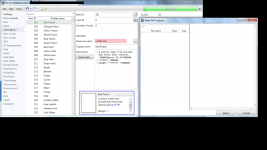
Can someone tell me what to do to see the sprites?

and why does the Meta GRF Explorer stay empty?

shouldn't I be able to choose sprites there?

 
attachicon.gif
Unbenannt.png

Can someone tell me what to do to see the sprites?

and why does the Meta GRF Explorer stay empty?

shouldn't I be able to choose sprites there?
It is empty because your resource paths aren't set.

Getting started

Create a new project from File > New project. Go in the settings tab and set the path of your database. If you're using pre-renewal, then drop the pre-re folder in the "Server DB path" box (drop the re folder otherwise). Don't drop your "db" folder, it needs to be a subpath!

...

The last setting is the resource files and it is optional. Simply drag and drop a GRF in the paths list. This will add icons in the items list view (it will also make the application slower when scrolling for that list).
You can also drop a data folder.

 
Unbenannt.png

Awesome now I got it!

But I can't just drag and drop it to the path like you said..

I edited the Project info and added the path there, like:

[server database editor - Resources]=C:Users...ROdata.grf

Can I add more paths? How?
default_smile.png


attachicon.gif
Unbenannt.png

Awesome now I got it!

But I can't just drag and drop it to the path like you said..

I edited the Project info and added the path there, like:

[server database editor - Resources]=C:Users...ROdata.grf

Can I add more paths? How?
default_smile.png
If you can't drag and drop, it means you have issues with privileges (you should not start the application with admin privileges - all you have to do is open the executable/project shortcut normally). Anyway, if you still can't drag and drop, separate the paths with comas to add more.

[server database editor - Resources]=C:ROdata,C:ROserver.grf,C:ROdata.grf

 
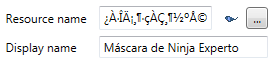
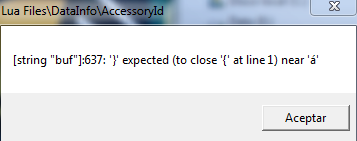
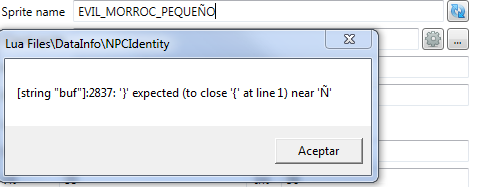
Hi, i got this lua error because the ragnarok client don't support especial characters for accessoryId :S

5406d51ef87ec8314f2b37aa8e684f46.png


821f3dfc6fdb87ae6441ae64832aa502.png


Oh god, i love you, thx!!

 
Import from SQL can be great.

How can i convert my SQL db to txt?
I'm afraid this feature won't be implemented unless someone gives me a good reason or advantage for it. The SQL database files are generated from the text files, it shouldn't be the other way around. Such a feature is also prone to errors and it is discouraged : 

Code:
-- NOTE: This file was auto-generated and should never be manually edited,--       as it will get overwritten. If you need to modify this file,--       please consider modifying the corresponding .conf file inside--       the db folder, and then re-run the db2sql plugin.---- Table structure for table `item_db`--
 
Import from SQL can be great.

How can i convert my SQL db to txt?
I'm afraid this feature won't be implemented unless someone gives me a good reason or advantage for it. The SQL database files are generated from the text files, it shouldn't be the other way around. Such a feature is also prone to errors and it is discouraged : 

-- NOTE: This file was auto-generated and should never be manually edited,-- as it will get overwritten. If you need to modify this file,-- please consider modifying the corresponding .conf file inside-- the db folder, and then re-run the db2sql plugin.---- Table structure for table `item_db`--
v 1.1.2.2 got warnings  but 1.0.9 worked fine

2NleW-UkS.png


Last edited by a moderator:
Srry Tokei, the same problem with monsters ><
Totally forgot about the NPC's tables! Fixed in 1.1.2.3 : http://www.mediafire.com/download/p0zhcc8ipa6cjt3

v 1.1.2.2 got warnings  but 1.0.9 worked fine
I'm using a new encoding system in 1.1.2.3, so please update to this version. If you're still having the issue, use "Copy exception" and paste the output here or on pastebin. Also, check your database path; it hasn't been able to find any files, which is somewhat suspicious!

 
Srry Tokei, the same problem with monsters ><
 Totally forgot about the NPC's tables! Fixed in 1.1.2.3 : http://www.mediafire.com/download/p0zhcc8ipa6cjt3

v 1.1.2.2 got warnings  but 1.0.9 worked fine
 I'm using a new encoding system in 1.1.2.3, so please update to this version. If you're still having the issue, use "Copy exception" and paste the output here or on pastebin. Also, check your database path; it hasn't been able to find any files, which is somewhat suspicious!
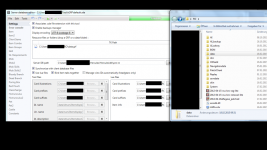
I have updated to v 1.1.2.3 and here are my settings:
A5ujZEWKC.png
 it throws an error msg window, saying: 'Object reference not set to an instance of an object'

Code:
--------------		  Message		  --------------並未將物件參考設定為物件的執行個體(Object reference not set to an instance of an object)。--------------	    Stack trace	    --------------   於 GrfToWpfBridge.Application.DefaultErrorHandler._reportAnyManagedExceptions(String message, Exception exception, ErrorLevel errorLevel)   於 GrfToWpfBridge.Application.DefaultErrorHandler.Handle(Exception exception, ErrorLevel errorLevel)   於 SDE.Tools.DatabaseEditor.SdeEditor._reloadDatabase(Boolean alreadyAsync)   於 SDE.Tools.DatabaseEditor.SdeEditor.<ReloadDatabase>b__2()   於 GRF.Threading.GrfThread.<Start>b__3()   於 System.Threading.ThreadHelper.ThreadStart_Context(Object state)   於 System.Threading.ExecutionContext.RunInternal(ExecutionContext executionContext, ContextCallback callback, Object state, Boolean preserveSyncCtx)   於 System.Threading.ExecutionContext.Run(ExecutionContext executionContext, ContextCallback callback, Object state, Boolean preserveSyncCtx)   於 System.Threading.ExecutionContext.Run(ExecutionContext executionContext, ContextCallback callback, Object state)   於 System.Threading.ThreadHelper.ThreadStart()--------------		 Exception		 --------------System.NullReferenceException: 並未將物件參考設定為物件的執行個體(Object reference not set to an instance of an object)。   於 SDE.Tools.DatabaseEditor.Engines.Parsers.TextFileHelper.ReadNextSingle(StreamReader reader)   於 SDE.Tools.DatabaseEditor.Engines.Parsers.TextFileHelper.<GetSingleElement>d__8.MoveNext()   於 SDE.Tools.DatabaseEditor.Generic.DbLoaders.DbLoaderMethods._loadCardPostfixes(AbstractDb`1 db, Byte[] data)   於 SDE.Tools.DatabaseEditor.Generic.DbLoaders.DbLoaderMethods.DbClientLoader(DbDebugItem`1 debug, AbstractDb`1 db)   於 SDE.Tools.DatabaseEditor.Generic.Core.DbClientItems._loadDb()   於 SDE.Tools.DatabaseEditor.Generic.Core.AbstractDb`1.LoadDb()   於 SDE.Tools.DatabaseEditor.Engines.DatabaseEngine.GenericDatabase.Reload(IProgress progress)   於 SDE.Tools.DatabaseEditor.SdeEditor._reloadDatabase(Boolean alreadyAsync)  於 = at
 
Last edited by a moderator:
Back
Top