Custom Quest Sprites (alt+u)

Kyoya G

New member
Messages
8
Points
0
Age
25
Location
Brazil
Emulator
Hello, 

I added some custom quests and they were ok, but the sprites and the count(how many monster or item left) didnt work.

I added by following some topics here but they were very old so Im not sure if its rigth.

I did it by modifying these files:

- quest_db.conf:

{
Id: 20017
Name: "Treinamento Inicial"
},


- questid2display.txt:

20017#Treinamento Inicial#SG_FEEL#QUE_NOIMAGE#
Prove que voce e capaz de ser treinado por mim, mate 10 Esporos e volte para falar comigo!#
Mate 10 Esporos.#


-  ep_141quest_list.lub (data\luafiles514\lua files\quest):

{
name =[[Treinamento Inicial]],
scrfilename = [[epsoid141Quest]],
questID = 20017,
},


- epsoid141_list.lub (data\luafiles514\lua files\quest\questinfo):

[20017] = {
NPCToName = "Tayen",
NPCToMap = "payon",
NPCToSpr = "F_ORIENT_03",
NPCToX = 166,
NPCToY = 101,
NPCFromName = "Tayen",
NPCFromMap = "payon",
NPCFromSpr = "F_ORIENT_03",
NPCFromX = 166,
NPCFromY = 101,
Item = "",
PrizeItem = "",
Title = "Treinamento Inicial",
Info = "Prove que voc??capaz de ser treinado por mim, mate 10 Esporos e volte para falar comigo!",
Hunt1 = "< link = \"ESPORO\">Esporo<\\end> x 10 ",
Hunt2 = "",
Hunt3 = "",
Time = "0",
LV = "0",
},


Here is the result:      (missing sprite and the count of how many esporos I need to kill)

https://1.bp.blogspot.com/-qvZjAaEsSQA/W25wj6qtcQI/AAAAAAAAlAU/Aniv9kZUvPoo94JXoi8R2c6kjQRynwG8QCLcBGAs/s1600/sprite.png

Did I do it rigth? Is it missing any file?

How can I add the sprites?

Thanks

 
Last edited by a moderator:
You mentioned file name as "epsoid141_list"  pretty sure that's not the name in kRO

 
You mentioned file name as "epsoid141_list"  pretty sure that's not the name in kRO
Yes, I edited it because is the only file there:

(data\luafiles514\lua files\quest\ep_141quest_list.lub)   and    (data\luafiles514\lua files\quest\questinfo\epsoid141_list)

Should I create a new file with my custom quests?

 
My mistake, it seems that's correct name.

Which client are you using? (By the looks of screenshot, it seems it isn't reading Lua file).

 
as for the count, you need to add a target and the count in quest_db.conf

{
Id: 20017
Name: "Treinamento Inicial"
Targets: (
{
MobId: 1002
Count: 10
},
},


for your lua file, I'm pretty sure it's not read. Try putting it into the official one and if it works, check your custom settings.

 
Last edited by a moderator:
My mistake, it seems that's correct name.

Which client are you using? (By the looks of screenshot, it seems it isn't reading Lua file).
Im using kRO 2018.03.27 client. 

My hexed is 2016-07-06Ragexe.

Yes, my Iteminfo is lub too. Seems its not reading lua files. Do you think it is a problem?

Thanks~

as for the count, you need to add a target and the count in quest_db.conf

{
Id: 20017
Name: "Treinamento Inicial"
Targets: (
{
MobId: 1002
Count: 10
},
},


for your lua file, I'm pretty sure it's not read. Try putting it into the official one and if it works, check your custom settings.
Yeees, it worked, the count is working now, thank you so much.

But I still with the sprites(navigation) problems. As you said it seems that my quest lub files arent read.

I took a look into kRO data quest files and I think they arent read too, seems like only questid2display.txt(in my data) and quest.conf(in my client) are read.

Is there a way to make it read those files or it is my client that dont accept npc quest sprites?

 
Im using kRO 2018.03.27 client. 

My hexed is 2016-07-06Ragexe.

Yes, my Iteminfo is lub too. Seems its not reading lua files. Do you think it is a problem?

Thanks~

Yeees, it worked, the count is working now, thank you so much.

But I still with the sprites(navigation) problems. As you said it seems that my quest lub files arent read.

I took a look into kRO data quest files and I think they arent read too, seems like only questid2display.txt(in my data) and quest.conf(in my client) are read.

Is there a way to make it read those files or it is my client that dont accept npc quest sprites?
For newish client like early 2018(ragexeRE) clients you can edit System/OngoingQuestInfoList_Sakray.lub, I guess quest lub which you are currently editing was introduced on early 2013.

The file you are editing does not show npc image if it's on progress, you have added it in ep14.1, so if you check there, it would show npc I suppose(if those Lua/lub is even read by 2016 client)

 
For newish client like early 2018(ragexeRE) clients you can edit System/OngoingQuestInfoList_Sakray.lub, I guess quest lub which you are currently editing was introduced on early 2013.

The file you are editing does not show npc image if it's on progress, you have added it in ep14.1, so if you check there, it would show npc I suppose(if those Lua/lub is even read by 2016 client)
I looked for that file but I only found System/OngoingQuestInfoList.lub and I edited it, but it still doesn't work. 

I guess that, as you mentioned, those lub files(data/luafiles514/luafiles/quest) are not even being read by my 2018 client.

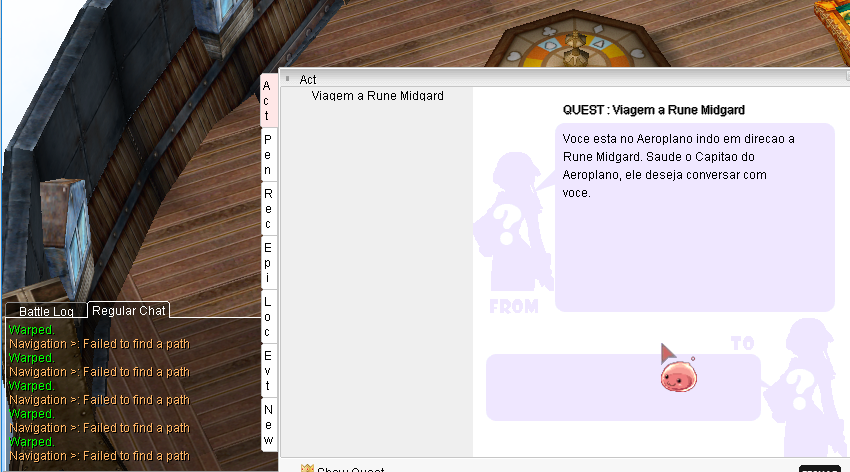
I noticed that not only the sprites are not working but also the navigation, as you can see here: 

asdasd.png


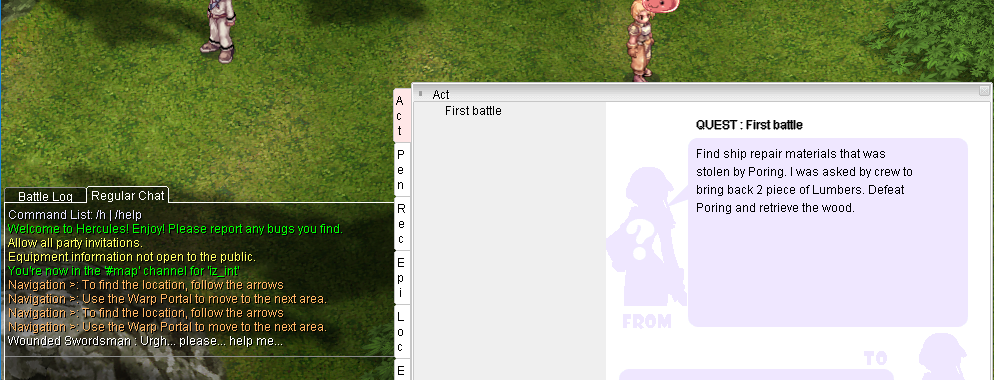
Besides that I also noticed that even the original quests sprites are not working too, only the navigation, as you can see here:

asdasdasdasdasd.png


I dont know if Im rigth but I think those sprites are related with navigation system.

I guess the problem is with my client, hexed, or translated data and system versions...

Could you recommend me a client/hexed version and translation that the npc quests sprites and navigation system works??

Thanks for helping me~

 
if you using 2016 exe, then you must use lua/txt and other files from 2016 version. 2018 files with outdated client exe may not works.

 
if you using 2016 exe, then you must use lua/txt and other files from 2016 version. 2018 files with outdated client exe may not works.
which files? 

I tried every kind of file about quests that I found in my exe...

Should I update my exe or take a older version client?

thanks...

 
all files. you should find official kro files for exact client exe version. If versions bit different you still may have some errors.

After if all works without errors, you can mod data, add / remove files etc.

 
Back
Top