
You are using an out of date browser. It may not display this or other websites correctly.
You should upgrade or use an alternative browser.
You should upgrade or use an alternative browser.
Need help again :D Black walls appears on the Map
- Thread starter kneeeeel
- Start date
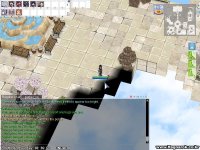
This indeed seems like a lighting issue. And many things don't appear ingame like they do in browedit. For example, try making gradual light decrease in browedit, and check how it looks like in browedit and how it looks ingame.
P.S. Also, just some warning. If you didn't do so intentiaonally, the floor tiles seems way messed up. I think you should clean them up.
P.S. Also, just some warning. If you didn't do so intentiaonally, the floor tiles seems way messed up. I think you should clean them up.

Hello friend, the issue is because you have yellow area (means empty area) at the edges of the texture of the map.
Since it is a sky map, please, use magenta color (#ff00ff) as a texture and fill the yellow areas in browedit with this texture. The issue should be fixed.
Good luck

Since it is a sky map, please, use magenta color (#ff00ff) as a texture and fill the yellow areas in browedit with this texture. The issue should be fixed.
Good luck

Yommy
Community Contributors
in the client, you can do /lightmap
to remove the lighting
to remove the lighting