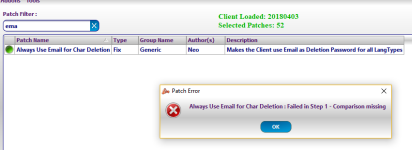
Nemo patcher

if nemo crashed, here probably no one can help, because binary is closed source and author is gone.

But you can try run it on other os or without antivirus.

Also try less patches

And try to other clients, is it crashing too or not

 
The disable buttons not working when I tried it on 2018-03-09RagExe and 2018-03-09aRagExe(Zero) cash button and other buttons I tried to remove still there.

 
@4144  Brother, i found problems when wanting to patch the April client....I do not understand if it is for a patch but now the client reads both clientinfo and sclientinfo, but that is not the problem, the detail is that it only allows me to login to the server "if I have both xml files inside of the data folder and this make me to exit this error window: HERE

Now if I remove the file sclientinfo I do not get any error but it does not allow me to login to the server: HERE

NOTE: I believe that from the date of April the clients now is reading only sclientinfo.xml

 
First error look like missing resource file.

 
@4144 No, brother, the error is of the .xml files, the client of April only reading sclientinfo.xml, If you have the sclientinfo file in your data folder shows that error, but nevertheless, allows you to enter the server normally.  

If I delete the sclientinfo and use again "clientinfo"  the error disappears but it does not allow me to enter the server.

i am testing with: 2018-04-04cRagexeRE 

Note: this only happens with the client of the month of April

View attachment 4649

 
Last edited by a moderator:
Error show missing some navigation files.

This mean you updated exe, but forgot update grf or data

 
present or missing error may depend on language selected in external or buildin configuration file

 
I have updated my grf,  and I am use this configuration for both files, clientinfo and sclientinfo: 

<?xml version="1.0" encoding="euc-kr" ?>
<clientinfo>
<desc>Ragnarok Online Zero</desc>
<servicetype>korea</servicetype>
<servertype>primary</servertype>
<connection>
<display>Ragnarok Zero</display>
<address>127.0.0.1</address>
<port>6900</port>
<version>46</version>
<langtype>0</langtype>
<registrationweb>www.ragnarok.com</registrationweb>
<loading>
<image>loading00.jpg</image>
<image>loading01.jpg</image>
<image>loading02.jpg</image>
<image>loading03.jpg</image>
<image>loading04.jpg</image>
</loading>
</connection>
</clientinfo>

- This server selection windows not active when I use clientinfo.xml.  It only shows when I use sclientinfo: HERE

 
Last edited by a moderator:
@OmarAcero basically you're using a RE client, that means by default its using servertype: sakray now in your sclientinfo you're defining that as primary, the client tries to find function queryNavi_PickNpc in navi_f_krpri.lub  and cannot find it since its not yet added to kRO main servers therefore you can fix you issue either by manually applying that update into the primary files or use the correct servertype for the client you're using.

 
Last edited by a moderator:
@4144  @Asheraf Thanks for your time,

Very interesting the today topic and I hope that other people will serve them. I did not really know about the sakary and primary configuration types, they are basic issues but at the same time very old.

 
Last edited by a moderator:
Any update on how you fixed this error? ->> https://imgur.com/a/CJEQ7

I'm having the same issue using latest kRO client + 2018-04-04cRagexeRE

Also, my character items are not displaying on my character in game but does in character select.

Anyone else having these same issues?

 
Added new patch "Set fixed job id in char create dialog"

It allow set fixed job id on char creation. Should works for doram clients

 
Oh, i have it not pushed fixed too... WIll push after some time

 
Back
Top