(null).bmp

aabarreto

New member
Messages
32
Points
0
So I added a custom item... The script works fine, but everything in the game became an apple and I never saw the actual sprite working.

Those are my lines in ItemInfo.lua:

    [77001] = {
        unidentifiedDisplayName = "Pegasus",
        unidentifiedResourceName = "Pegasus",
        unidentifiedDescriptionName = { "Pegasus" },
        identifiedDisplayName = "Pegasus",
        identifiedResourceName = "pegasus",
        identifiedDescriptionName = {"Pegasus"},
        slotCount = 4,
        ClassNum = 20000
    },

I also tried these:

 identifiedResourceName = pegasus,

 identifiedResourceName = "Pegasus",

 identifiedResourceName = "PEGASUS",

Those are the files on data.grf:
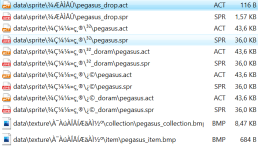
image.png

Where am I wrong?

 
So I added a custom item... The script works fine, but everything in the game became an apple and I never saw the actual sprite working.

Those are my lines in ItemInfo.lua:

    [77001] = {
        unidentifiedDisplayName = "Pegasus",
        unidentifiedResourceName = "Pegasus",
        unidentifiedDescriptionName = { "Pegasus" },
        identifiedDisplayName = "Pegasus",
        identifiedResourceName = "pegasus",
        identifiedDescriptionName = {"Pegasus"},
        slotCount = 4,
        ClassNum = 20000
    },

I also tried these:

 identifiedResourceName = pegasus,

 identifiedResourceName = "Pegasus",

 identifiedResourceName = "PEGASUS",

Those are the files on data.grf:

View attachment 6759

Where am I wrong?
Change all names into pegasus

something like this

collection : pegasus.bmp

item : pegasus.bmp

change pegasus_drop.act and pegasus_drop.spr into pegasus.act and pegasus.spr

 
So I added a custom item... The script works fine, but everything in the game became an apple and I never saw the actual sprite working.

Those are my lines in ItemInfo.lua:

    [77001] = {
        unidentifiedDisplayName = "Pegasus",
        unidentifiedResourceName = "Pegasus",
        unidentifiedDescriptionName = { "Pegasus" },
        identifiedDisplayName = "Pegasus",
        identifiedResourceName = "pegasus",
        identifiedDescriptionName = {"Pegasus"},
        slotCount = 4,
        ClassNum = 20000
    },

I also tried these:

 identifiedResourceName = pegasus,

 identifiedResourceName = "Pegasus",

 identifiedResourceName = "PEGASUS",

Those are the files on data.grf:

View attachment 6759

Where am I wrong?
Never put custom objects in your data.grf!
Always put them in the grf read first by your client!
Do you have the luafiles514 / lua files / datainfo folders in your <mygrf> .grf?
Do you have the accessoryid.lub and accname.lub files in your <mygrf> .grf ??
Did you enter ACCESSORY_Pegasus = 20000 and [ACCESSORY_IDs.ACCESSORY_Pegasus] = "_Pegasus"?

 
Never put custom objects in your data.grf!
Always put them in the grf read first by your client!
Do you have the luafiles514 / lua files / datainfo folders in your <mygrf> .grf?
Do you have the accessoryid.lub and accname.lub files in your <mygrf> .grf ??
Did you enter ACCESSORY_Pegasus = 20000 and [ACCESSORY_IDs.ACCESSORY_Pegasus] = "_Pegasus"?
And which grf is that? How do I know it?

Nope... I have luafiles514/lua files, but not the datainfo folders...
No accessoryid.lub; yes accname.lub
Nope... It should be on those files? I saw that in the new clients I would only need to edit iteminfo...

 
Last edited by a moderator:
And which grf is that? How do I know it?

Nope... I have luafiles514/lua files, but now the datainfo folders...
No accessoryid.lub; yes accname.lub
Nope... It should be on those files? I saw that in the new clients I would only need to edit iteminfo...
In my memories, you use the anacondaq pack.

To add custom elements, go to your data.grf extract accessoryid.lub and accname.lub from luafiles514 / lua files / datainfo.

Add ACCESSORY_Pegasus = 20000 in accessory id at the end of your file and [ACCESSORY_IDs.ACCESSORY_Pegasus] = "_Pegasus" in accname.lub

save

add now files in the grf which is read first by your client, save.

Don't forget to add the object in item_db.conf

do @reloaditemdb and it should work.

Yes you also have to add that in iteminfo.

 
Last edited by a moderator:
In my memories, you use the anacondaq pack.

To add custom elements, go to your data.grf extract accessoryid.lub and accname.lub from luafiles514 / lua files / datainfo.

Add ACCESSORY_Pegasus = 20000 in accessory id at the end of your file and [ACCESSORY_IDs.ACCESSORY_Pegasus] = "_Pegasus" in accname.lub

save

add now files in the grf which is read first by your client, save.

Don't forget to add the object in item_db.conf

do @reloaditemdb and it should work.

Yes you also have to add that in iteminfo.
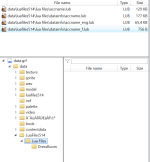
Ok, something's wrong then, because I can't see/extract /datainfo from inside my data.grf, also I don't seem to have accessoryid.lub... But I do have accname.lub.

When I search for "accname.lub", it shows up as in /datainfo, but the folder doesn't appears in the folders list...
 

Which .grf is read first by my client? I don't know how to know that...
 

image.png

Maybe I should get the original data.grf again and start all the customs over? Just tell me in what .grf I should put the files, please...

image.png

I didn't find any other .grf...

 
Back
Top