RO Credentials (ROCred), v1.10.0 - last updated 2017/12/31

So therefore, not all clients are capable of using rocred. (i guess old clients... not sure)

Same with my case, before i cannot use rocred because of that thingy, but after changing to newer clients... it is now working.

 
INI:

  • Menu "Action" -> "Add a new resource..."
  • Button "Open file with new resource" -> select your rocred.ini
  • Field "Resource Type": Enter RCDATA
  • Field "Resource Name": Enter CONFIG
  • Field "Resource Language": Enter 0
  • Button "Add Resource"
  • Menu "File" -> "Save"
Skins (ex. background):
  • Menu "Action" -> "Add a new resource..."
  • Button "Open file with new resource" -> select your background bitmap (.bmp)
  • Field "Resource Type" should turn into BITMAP.
  • Field "Resource Name": Enter BGSKIN
  • Field "Resource Language": Enter 0
  • Button "Add Resource"
  • Menu "File" -> "Save"
rocred-reshacker.png
 
Last edited by a moderator:
INI:

[*]Menu "Action" -> "Add a new resource..."

[*]Button "Open file with new resource" -> select your rocred.ini

[*]Field "Resource Type": Enter RCDATA

[*]Field "Resource Name": Enter CONFIG

[*]Field "Resource Language": Enter 0

[*]Button "Add Resource"

[*]Menu "File" -> "Save"

Skins (ex. background):

[*]Menu "Action" -> "Add a new resource..."

[*]Button "Open file with new resource" -> select your background bitmap (.bmp)

[*]Field "Resource Type" should turn into BITMAP.

[*]Field "Resource Name": Enter BGSKIN

[*]Field "Resource Language": Enter 0

[*]Button "Add Resource"

[*]Menu "File" -> "Save"

rocred-reshacker.png
That works perfectly,thanks a bunch, Can I also use this method to combine ROCred with my client.exe  ?

 
Not quite sure what you mean with combine, but putting the client in ROCred's resources, will not make ROCred magically pull the client out of it's sleeve when you press "Start".

 
Last edited by a moderator:
What if I wanted to launch the patcher using the WWW button. What should I put on actiondata?

the patcher is in the same folder as the rocred.

Code:
; Action to invoke when the button is pressed.; Values:;       0: Launch application or website;       1: Launch application or website, and close application;       2: Close application;       3: Display a message (uses C-style escaping characters)ActionType=0; Data associated with button's action type.; Note: To refer to a string table entry, use #<number> (ex. #123).ActionData=http://nn.nachtwolke.com/ <-- THIS ONE
 
ActionType=0 (1 if you want to make the launcher close)ActionData=PatcherName.exe
Edit:Updated to 1.9.2, adds support for ASLR/DEP. Some code maintenance.

 
Last edited by a moderator:
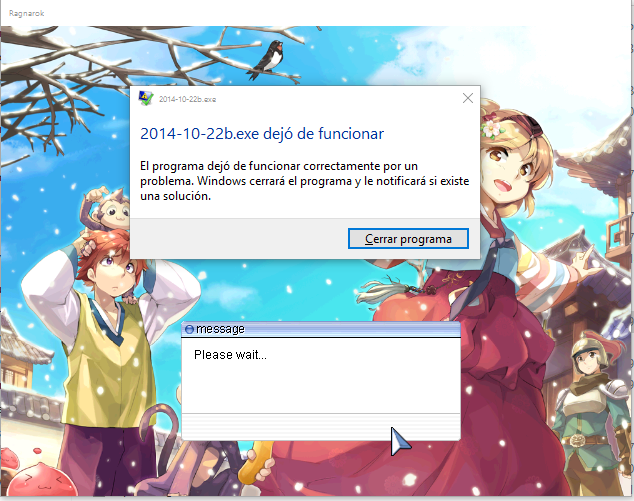
My exe 2014-10-22b is crashed when use Rocred, after service selection.

I tried with latest full kRo.

I diff SSO Login and Restore Login Window.

Does anyone know that occurs?

 
My exe 2014-10-22b is crashed when use Rocred, after service selection.

I tried with latest full kRo.

I diff SSO Login and Restore Login Window.

Does anyone know that occurs?
restore login window is enough, you don't need either sso login and rocred in order to use that client, unless you really want to use rocred you need to not diff your client with restore login window because they are not compatible

 
Did someone here tried this "ROCRED launched to CLIENT with ROCSHIELD"?

Cuz i tried it but seems not working. Please help me. thanks!

 
Guys.. How to make minimize button? Because right now only have quit/close button.. So.. Some of the lazy to open this rocred each time want to play so they sugguest can autostart in background and press some key to show rocred back..

 
Read the rocred.ini comments on how to set up.
Hi, thanks a lot Ai4rei, I managed to login to my server normally. But, I do not understand one thing, why do we need rocred.exe, if we have to put the password twice? Does rocred.exe only serve to save the MAC of the player? I'm confused / gt

Did I do some things wrong? I just copied the rocred.ini and rocred.exe files to my RO folder.

 
ROCred is for the case, where you do not have login in the client enabled (kRO client without Restore Login Window).

 
Last edited by a moderator:
ROCred is for the case, where you do not have login in the client enabled (kRO client without Restore Login Window).
I'm sorry I was a bit lost. I forgot to enable SSO Login ...
Agr works normally.
 
Thank you!
 
@suggestion
 
I advise you to inform in the main post that we should copy all the files from the download to the ragnarok folder and perform all configurations. Yes, they are beasts things, but often we are coming from other topics, totally lost.
 
Back
Top