RO Patcher Lite, v4.8.1.1373 - last updated 2025/10/03

Updated to 2.4.27, fixes possible buffer corruption (security issue).
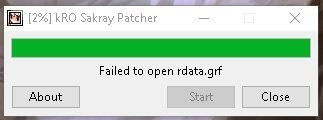
Hello Ai4rei, after update to last version 2.4.27 this happen: 

KRO sakray fail.jpg

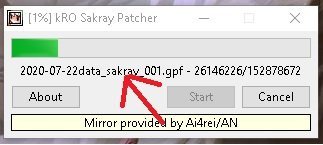
Happens exactly after this download finish:

process.jpg

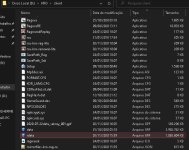
why this happen? The rdata is in kro folder. 

rdata in folder.jpg

 
Last edited by a moderator:
Seems .26 broke RGZ unpacking and since kRO has been resetting rdata.grf, it got corrupted. But no worries, the GRF will recover after I fix the patcher.

 
Updated to 4.0.0, this major release contains a refreshed UI, completely reworked GRF engine, native 64-bit builds and other, far too many under-the-hood changes and bug fixes to mention them all, see included doc/history.txt for details.

 
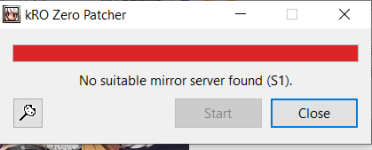
Any idea why i am getting this error message? (trying to update a 2019 kro client folder using your latest release for either rag/RE)

"No suitable mirror server found (S1)" ?


The client most likely is not a 2019-ish client, because it requests patches from 2018. I was recently running low on space on the mirror, so I had to remove year 2018 from the mirror.

 
Last edited by a moderator:
Updated to 4.0.1, this release fixes, among others, an issue that prevented updating jRO RAG, when there are more than one year worth of patches to apply.

Updated to 4.1.1, a maintenance release.

 
Last edited by a moderator:
Updated to 4.1.3, this release fixes an assertion when applying optimized patches.

Updated to 4.1.4, this release adds support for the new, short-lived (2021-11-03 ~ 2021-11-17) kRO Sakray server. This is a different server from the one removed in 4.1.2 and requires a new full client. There is no mirror support for this one and it is released only as part of the bundle package.
 
Last edited by a moderator:
Updated to 4.1.3, this release fixes an assertion when applying optimized patches.

Updated to 4.1.4, this release adds support for the new, short-lived (2021-11-03 ~ 2021-11-17) kRO Sakray server. This is a different server from the one removed in 4.1.2 and requires a new full client. There is no mirror support for this one and it is released only as part of the bundle package.
image.pngcan't patch for ZRO

 
Updated to 4.1.5, fixes reusage of waste in GRF archives was not enabled (ever since its introduction in 4.0.0). Depending on amount of wasted space, some archives may shrink in response to being updated. It also fixes the /testpak command reporting Sakray/Test archives as corrupted.

Updated to 4.1.6, fixes mirror server fallback from a different mirror server not working correctly.

Updated to 4.2.0, now processes updates of the official patcher immediately, so that the RO client does not have to restart for that. It also fixes two minor issues and updates to zlib 1.2.13.

 
Last edited by a moderator:
Hi Ai4rei,
this immediately crashes on Windows 11. I do not find a log or event viewer entry for the issue.

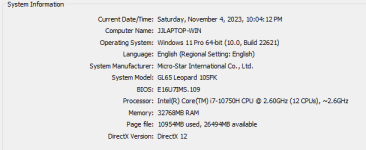
I do have Win 11 Pro that is joined to a domain, if that matters. Plenty of RAM available, and decent CPU. Plenty of Hard drive space on an NVMe.

image.png

I tried running in compatibility mode for Windows 8 and 7, run as administrator and not. I am running the patcher straight from my kRO base files folder, which I downloaded from the pinned topic by Ridley in this forum. I have a patchRE.inf with the following content:

Code:
ó
Any ideas?

 
Last edited by a moderator:
Assuming version 4.2.1, 64-bit, is that right? Can you try, if:

  1. it crashes with the other platform build? (i.e. if you use 64-bit, try 32-bit and vice versa)
  2. it crashes with recent older versions as well.

Thank you.

 
Last edited by a moderator:
Assuming version 4.2.1, 64-bit, is that right? Can you try, if:

  1. it crashes with the other platform build? (i.e. if you use 64-bit, try 32-bit and vice versa)
  2. it crashes with recent older versions as well.

Thank you.
Correct, version 4.2.1.1309 listed as latest on your website. Using 64-bit

Tried that version in 32-bit, same issue.

Grabbed 4.1.6.1297 and 4.1.5.1292 in both x32 and x64 varieties and still same issue. When you double click on the exe to run it flashes the file explorer window but nothing else happens. No error, no window, nothing. Also have disabled both Malwarebytes and Windows Defender real time protection, no change.

 
Hi Ai4rei

I downloaded the full client from rAthena that Akkarin posted over there that I noticed includes your patcher and that works, the patcher opens and works. I notice that it comes with only 4.1.6 so I'll try updating it and see if I have the same issue.

Thanks for your attention.

 
Back
Top