Ragnarok Offline Newbie Pack 2022 | Make your RO server in less then 5 minutes

Hi everyone, I want to first thank anacondaq for his amazing job on this guide and setup. It has helped me setup a server for my friends to play while on quarantine. I was wondering if someone could help me. I was trying to mod the exe provided with this setup (2018-04-18bRagexeRE_patched.exe) to allow auras to be display for players on level above 99 as I've set my server to be 255/120.

Can someone help? I tried pathing again the already patched exe provided by anacondaq but that didn't work well as it crashes as soon as the map loads.

 
fix error message, it clearly show what wrong.

if you want lost all your changes run

git reset --hard origin/master


If you want save your changes, follow instruction in error message. probably also look into git manual, how to use it better

 
following the guide from annieRuru i still can't figure out how to fix the un-walkable 2nd floor of criatura academy. ive tried linking the grf-files conf to where my download old criatura / izlude map is and run the server (since mapcache is already integrated with hercules map-server) it changes the map, but 2nd floor is still un-walkable. is there a fix for this yet? 

UPDATE!
- i fixed it by copying pre-re mapcache of iz_ac02 etc. maps on the re folder in hercules\maps\ folder. 

this issue may seem not such a big deal for servers with Job changers, but for official-like ones, it does. 

 
Last edited by a moderator:
@anacondaq I'm using different client 20180621a and when I log into my user name and pass it just shows "Failed to Connect" and when I tried to edit the clean client provided by server pack its the same issue "Failed to connect" even with recommended settings. however when I used the patched client which includes in server pack it works. mind sharing your profile used in NEMO?

Capture.PNG

 
sorry bro , i hv no idea what im facing here . i had already follow you step to do i still cant run my server 

can any one teach me ? 

image.png

 
On 3/4/2019 at 9:05 AM, anacondaq said:

To view this content we will need your consent to set third party cookies.
For more detailed information, see our cookies page.
How to auto update patch? if I make changes on the server, how are they going to receive the changes I made on the server for players so that they wont receive errors? I just bought VPS from you

 
@anacondaq well sir can you help me fix the asura strike on your pre renewal emulator? its not working, i try to ask on the forum but well just like your topic here "Newbie" we really dont understand coding i try to read and watch video but i really dont understand   :(  

trying to watch the tutorial on the video but its still not working :( :( :( :(

View attachment 5736

EDIT: DONE!!!!!!!!!!!!!!! YEAH!!!!!
Hi, i also have some problems using asura strike. im trying to figure out how to use asura using soul collect>Explosion>soul collect but then asura cant use? And having buff "ABRASIVE" while on explosion.

Any fix on this?

Edit:

Just saw gadzkun topic on this and needs recompiling,

Is there a complete/updated file where theres no recompiling needed?

Would be much appreciated.

 
Last edited by a moderator:
@anacondaq
Hello, could you please tell me what version of Nemo you have used and also which patches you applied to the client?

Thanks in advance!

 
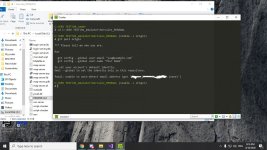
you see what git suggest to you to run.

change email and name to your email/name and run this commands. It worst case you can run this commands without change anything.

 
hello are there any updates regarding the missing items, mobs, empty maps and missing instances and quests?

 
anacondaq, I would love if you could include Ragnarok Zero in this pack as well ;o

Or refer to some guide that works for Zero? I've been struggling to get it working, despite trying to patch things with Nemo and setting the appropriate PACKETVER for zero in hercws.
you need zero exe + zero client, I have zero experience with this :)  Not even tried before (because it's out of my interest). But maybe in very near future (maybe after a month) I will try to do that. If not forget. I think it wont be hard to do. Sorry, but I can't help you.

Thanks very much!

pls say, where can I find information about adding npc (healer/warper…) and commands for players (@autoloot/@go..)?
I cant find these topics on forum with search(

View attachment 5759
readme.txt

Inside emulator /doc/ folder read it.

Wiki of hercules

Ideally script_commands.txt (very long file, but please read it, it will explain everything)

so in this Rag Exe. Guild emblem doesn't show ( or not implemented ) ? enlighten me.
I don't know, It should. If not try /showname in game (in chat). I tried - and it worked. But even if it does not work. you can always download or open 05_folder from the RO Offline Pack, and open Nemo Patcher and patch again the exe with patches that you wish to see. 

Please try latest full kRO client by the link in the first post. 

Hey man, nice you still continue this.  

I'm having a problem, I'm making custom mobs I'm following https://github.com/HerculesWS/Hercules/wiki/Custom-Mobs instructions but I can't find the mob_avail.txt,  datainfo/npcidentity.lua and datainfo/jobname.lua in your pack, did I miss anything or is that link far too outdated.
What is data.grf? It's archive (like rar, or zip) of files inside /data/ folder.

What is .lua or lub? Lua = uncompiled lub file. Lub it's compiled.

Lua you can easy open with text editor and read what is written here, lub you can't open and you will see hex codes (byte code).

BUT! There is a trick inside game client to load lub files always first over lua files. So if you can't find lua file, try to open lub file with GRF Editor, it has built-in lub  to lua decompiler. Also about other files - i do not remember, sorry. Ideally if you will start to use SDE (server database editor) and inside GUI will add all what you want. If not - try to experiment and do not afraid to break files (always do backups first). And try to play with files, edit, copy-paste lines, and you will get what is related for what. Also you can ask community for help. 

Please help, i cant run the server

View attachment 5784


As you see on your screenshot you have denied access to your user inside emulator with name herc_PRE_user which trying to connect to localhost (your PC database), but something wrong.

What can be wrong?
Maybe the SQL server offlien (try to restart)

Maybe you have installed some mysql server (you should not do that, because inside Open Server already built-in mysql server).

If nothing helps - you can always re-download pack by links in the first post where everything works out the box. 

How to change exp/job exp/drop rate?thanks in advance


check herc wiki, and try to use google with next query: google.com -> "site:herc.ws how to change drop rate".

But I did answer for most common questions inside readme.md already. Try to open the file with any text editor.

Alternatively you can install VSCode (editor by Microsoft) and open readme.md with markdown syntax high lite and you will see that everything structured and explained for newbies. 

Thanks for the responce. Okay, i get it now. But theres another problem. 

I can't run the red flag. Here's the screenshot sir.

View attachment 5787
I think you don't have installed Microsoft C++ Redistributables. Try to open 08_ folder inside the pack root folder, and install for your OS or x64.exe or x86.exe which contains all C++ Redistributables by Microsoft. Usually the OpenServer require these libs to be installed. 

EDIT : DONEEEEE USING GRF ! :)  

@anacondaq hi bro... can you help me how to remove the floating icon on renewal emulator? i want to remove ALL the floating icon so its like pre-renewal clean and classic,

keep calm and play ragnarok offline while lockdown

stay  healty guys :)

View attachment 5842

View attachment 5843

View attachment 5844

what i do is 

First you need tools like https://git-scm.com/downloads
and https://visualstudio.microsoft.com/vs/whatsnew/

Install it!

after that, go to emulator folder, open 

Hercules-14.sln

Hercules-15.sln

Hercules-16.sln

using visualstudio,, klik on Build bar on top, and choose build solution, DONE! 

after that download this patch https://herc.ws/board/applications/core/interface/file/attachment.php?id=5734

put the patch file on your emulator

[SIZE=1.4rem]and then right click on your emulator folder and git bash here[/SIZE]

[SIZE=1.4rem]and type [/SIZE]"git apply (patchfilename).patch"

and repeat rebuild the Hercules(14/15/16).sln again

good luck 
Find and edit towninfo.lub or data\luafiles514\lua files\signboardlist.lub

@anacondaq good day.. can u tell me what is the problem here? 

View attachment 5845

View attachment 5846@anacondaq can u tell me what is the problem here? hmm i was just playing but after i logout i cant connect again.. TIA... btw. im a total newbie here
Please read readme.md and watch youtube video.

Do not skip anything, because this is bare minimul to guarantee that everything will work fine out the box. Otherwise you will have problems like that. Always restart your PC before trying to launch the game server. On your screenshot looks like you have double servers running or port blocked (rarely happens, busy by some app).

Hi im new btw thanks for this guide!

I have a question i want to remove this npc or hide it, can you help me? ty

View attachment 5853
npc/custom/support_me.txt you can rename it, or delete

Hi All,

Thank you for sharing this tutorial and the files.

I was able to compile the solution in Visual Studio 2015.

However when I tried to login in the client, I am getting this error.

View attachment 5854

I have no idea how to fix this and what is the cause of this error.

Please help me.

THank you in advance.
You don't need to compile the emulator, it's already pre-compiled by me in debug mode. But even if you did it, the error on the screen not related to compilation. The error on the screen related to data.grf and your kRO client. Please download full kro client by links in the first post, and everything will works fine, also do not mix different clients, they are not compatible. For example I support the topic since 2016? Or like that, and there was dozens of different versions with different client versions and date releases also with different client files for full kRO client, but all that you need to know - they almos always not compatible. So, if you wish to run RO offline -> use all files provided in the one folder, do not mix them. (that means you need to download ~4gb)

View attachment 5862

How can I fix this? I don't know what to do.
I think this is fixed in 20200419

Optionally you can fix it by importing upgrade files into your database. How to do it -> readme.md

double check your Char-server.conf

char ip 
??

Hi @anacondaq Good job!

Could you please to reupload the kRO client (07) ?? The link is broken ^^
Check the first topic links again. 

did you just @changejob or @changehairstyle? 

you are missing cloth sprite or hair sprite.


no, I did not use these commands.

Can you share to me how can I fix the missing cloth/hair sprite?

Thank you.
green flag -> terminal -> mysql -uroot -> use herc_prere_db; update `char` SET hair=0, hair_style=0, cloth_style=0 WHERE account_id > 1;

Hello, how do I create a New Gm Account?
read readme.md _M + edit login table in your database with phpmyadmin.

I have same problem..you fix it?


you fix it?


Try to download latest KRO and Data English translate clean ^_^

goto http://YourServerIP/phpmyadmin login your PHPMyAdmin user and pass...

Then find the login in your database the select your account there then change the GROUP from 0 to 99 ^_^


where can i find the id and passowrd? id: ragnarok pw: ragnarok it does not work.
??? read readme.md.

Hi everyone, I want to first thank anacondaq for his amazing job on this guide and setup. It has helped me setup a server for my friends to play while on quarantine. I was wondering if someone could help me. I was trying to mod the exe provided with this setup (2018-04-18bRagexeRE_patched.exe) to allow auras to be display for players on level above 99 as I've set my server to be 255/120.

Can someone help? I tried pathing again the already patched exe provided by anacondaq but that didn't work well as it crashes as soon as the map loads.
Wew, try to play with patches again. Also note: already applied patches you can find in the nemo folder in txt file (load profile (this txt file)) and you will see all applied patches to the exe inside the package. Also you can try to play with these patches. What about auras - I do not know, to be honest - do not remember. 

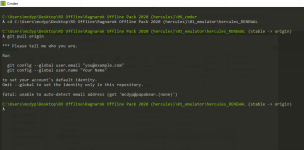
Please someone help me i can't recompile the server tried to 'git pull origin' shows this errors... 😕

View attachment 5892
Usually you don't need to do this if you don't know what is it.

Newbie pack - just entry point into the emulator software development, to make everything work, like a playground, and only after learning something new you will do some things. Upgrading emulator by yourself - means also you need after each file change inside /src/ folder to re-compile your emulator. Do you know how to do it? So, if you know how to compile -> you should to know how to use git.

Solving merge conflicts - not an easy thing to do, and require some deep understanding what is going on here. Since 20200419 version of the RO offline, you can always do git reset --hard command, and it will destroy all changes that will block your upgarde process. But I do not recommend to do it, because you can potentially lost your some custom script (that you will made or edit by yourself).

following the guide from annieRuru i still can't figure out how to fix the un-walkable 2nd floor of criatura academy. ive tried linking the grf-files conf to where my download old criatura / izlude map is and run the server (since mapcache is already integrated with hercules map-server) it changes the map, but 2nd floor is still un-walkable. is there a fix for this yet? 

UPDATE!
- i fixed it by copying pre-re mapcache of iz_ac02 etc. maps on the re folder in hercules\maps\ folder. 

this issue may seem not such a big deal for servers with Job changers, but for official-like ones, it does. 
If you will find more places like that what possible to fix, i will happy to provide update with fixes in the next release. I just need maps where problems occurs. You can use weediffcache tool for working with mapcache. 

@anacondaq I'm using different client 20180621a and when I log into my user name and pass it just shows "Failed to Connect" and when I tried to edit the clean client provided by server pack its the same issue "Failed to connect" even with recommended settings. however when I used the patched client which includes in server pack it works. mind sharing your profile used in NEMO?

View attachment 5897
my profile used in nemo inside nemo folder (exe folder). Just try to open different folder, you will find the small file with all applied patches (it's just .txt file).

sorry bro , i hv no idea what im facing here . i had already follow you step to do i still cant run my server 

can any one teach me ? 

View attachment 5899
the fix inside 20200419 (link in the top message). But optionally you can fix it by inserting requested sql files inside your game database with phpmyadmin for example. 

How to auto update patch? if I make changes on the server, how are they going to receive the changes I made on the server for players so that they wont receive errors? I just bought VPS from you
First of all -> not from me, i do not sell any vpses. Second -> it's just a guide where super simple toolkit for explaining how setup everything with images and with almost no efforts. Third -> about what patch are you talk about? Please explain. If you make changes on your server -> you need restart your server for apply these changes. Or alternatively you can use technical admin commands for restarting on the live server scripts, or battle conf files, or db files, or item database, or mob database. Please open script_commands.txt (search `@reload` command) (@reloaditemdb, @reloadscript @reloadmobdb, @reloadbattleconf) and so on.

Hi, i also have some problems using asura strike. im trying to figure out how to use asura using soul collect>Explosion>soul collect but then asura cant use? And having buff "ABRASIVE" while on explosion.

Any fix on this?

Edit:

Just saw gadzkun topic on this and needs recompiling,

Is there a complete/updated file where theres no recompiling needed?

Would be much appreciated.
no, without re-compiling impossible to change the behavior of the skill. 

@anacondaq
Hello, could you please tell me what version of Nemo you have used and also which patches you applied to the client?

Thanks in advance!
version of nemo - always latest, even now (v20200419 with latest hash available on gitlab).

Patches applied inside nemo you can find inside NEMO folder (exe folder or like that) it's .txt file i forgot how it called.

It will be stored near the patched Exe.

Hi guyus, need help. I can't update server-side because cmder wants to know who i am. View attachment 5911
Please try to use SourceTree app it's GUI for git. It will be much easier. 

hello are there any updates regarding the missing items, mobs, empty maps and missing instances and quests?
This is question not for me. I saw several pull request with some not bad content, like lasagna, but progress still very slow.

The  very good pros of herc.ws is the emulator technically far far ahead of rathena in technical aspect, but some really required by some people content are absent, and implementation of the content (technical part) already here, only left script, mob, warp part... 

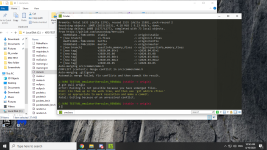
What wrong
Pls help meView attachment 5923
Try to use SourceTree app. Or GitKraken.

Update v20200419

TODO: 

Inside discord i suggest to write:
1. what is most missing content inside the package (maybe you looking for especially something, but you can't find it inside the package)

2. Where is your most common mistakes / problems that you face with the RO Offline Pack?

3. Bugreports / suggestions appreciated. 

Note: usually I do not answer on herc.ws board frequently, I visit the forum rare, and answer rare. Usually I do upgraes for the package once per few months. The package is stand-alone and you can upgrade it always by yourself.

 
you need zero exe + zero client, I have zero experience with this :)  Not even tried before (because it's out of my interest). But maybe in very near future (maybe after a month) I will try to do that. If not forget. I think it wont be hard to do. Sorry, but I can't help you.

readme.txt

Inside emulator /doc/ folder read it.

Wiki of hercules

Ideally script_commands.txt (very long file, but please read it, it will explain everything)

I don't know, It should. If not try /showname in game (in chat). I tried - and it worked. But even if it does not work. you can always download or open 05_folder from the RO Offline Pack, and open Nemo Patcher and patch again the exe with patches that you wish to see. 

Please try latest full kRO client by the link in the first post. 

What is data.grf? It's archive (like rar, or zip) of files inside /data/ folder.

What is .lua or lub? Lua = uncompiled lub file. Lub it's compiled.

Lua you can easy open with text editor and read what is written here, lub you can't open and you will see hex codes (byte code).

BUT! There is a trick inside game client to load lub files always first over lua files. So if you can't find lua file, try to open lub file with GRF Editor, it has built-in lub  to lua decompiler. Also about other files - i do not remember, sorry. Ideally if you will start to use SDE (server database editor) and inside GUI will add all what you want. If not - try to experiment and do not afraid to break files (always do backups first). And try to play with files, edit, copy-paste lines, and you will get what is related for what. Also you can ask community for help. 

As you see on your screenshot you have denied access to your user inside emulator with name herc_PRE_user which trying to connect to localhost (your PC database), but something wrong.

What can be wrong?
Maybe the SQL server offlien (try to restart)

Maybe you have installed some mysql server (you should not do that, because inside Open Server already built-in mysql server).

If nothing helps - you can always re-download pack by links in the first post where everything works out the box. 

check herc wiki, and try to use google with next query: google.com -> "site:herc.ws how to change drop rate".

But I did answer for most common questions inside readme.md already. Try to open the file with any text editor.

Alternatively you can install VSCode (editor by Microsoft) and open readme.md with markdown syntax high lite and you will see that everything structured and explained for newbies. 

I think you don't have installed Microsoft C++ Redistributables. Try to open 08_ folder inside the pack root folder, and install for your OS or x64.exe or x86.exe which contains all C++ Redistributables by Microsoft. Usually the OpenServer require these libs to be installed. 

Find and edit towninfo.lub or data\luafiles514\lua files\signboardlist.lub

Please read readme.md and watch youtube video.

Do not skip anything, because this is bare minimul to guarantee that everything will work fine out the box. Otherwise you will have problems like that. Always restart your PC before trying to launch the game server. On your screenshot looks like you have double servers running or port blocked (rarely happens, busy by some app).

npc/custom/support_me.txt you can rename it, or delete

You don't need to compile the emulator, it's already pre-compiled by me in debug mode. But even if you did it, the error on the screen not related to compilation. The error on the screen related to data.grf and your kRO client. Please download full kro client by links in the first post, and everything will works fine, also do not mix different clients, they are not compatible. For example I support the topic since 2016? Or like that, and there was dozens of different versions with different client versions and date releases also with different client files for full kRO client, but all that you need to know - they almos always not compatible. So, if you wish to run RO offline -> use all files provided in the one folder, do not mix them. (that means you need to download ~4gb)

I think this is fixed in 20200419

Optionally you can fix it by importing upgrade files into your database. How to do it -> readme.md

??

Check the first topic links again. 

green flag -> terminal -> mysql -uroot -> use herc_prere_db; update `char` SET hair=0, hair_style=0, cloth_style=0 WHERE account_id > 1;

read readme.md _M + edit login table in your database with phpmyadmin.

??? read readme.md.

Wew, try to play with patches again. Also note: already applied patches you can find in the nemo folder in txt file (load profile (this txt file)) and you will see all applied patches to the exe inside the package. Also you can try to play with these patches. What about auras - I do not know, to be honest - do not remember. 

Usually you don't need to do this if you don't know what is it.

Newbie pack - just entry point into the emulator software development, to make everything work, like a playground, and only after learning something new you will do some things. Upgrading emulator by yourself - means also you need after each file change inside /src/ folder to re-compile your emulator. Do you know how to do it? So, if you know how to compile -> you should to know how to use git.

Solving merge conflicts - not an easy thing to do, and require some deep understanding what is going on here. Since 20200419 version of the RO offline, you can always do git reset --hard command, and it will destroy all changes that will block your upgarde process. But I do not recommend to do it, because you can potentially lost your some custom script (that you will made or edit by yourself).

If you will find more places like that what possible to fix, i will happy to provide update with fixes in the next release. I just need maps where problems occurs. You can use weediffcache tool for working with mapcache. 

my profile used in nemo inside nemo folder (exe folder). Just try to open different folder, you will find the small file with all applied patches (it's just .txt file).

the fix inside 20200419 (link in the top message). But optionally you can fix it by inserting requested sql files inside your game database with phpmyadmin for example. 

First of all -> not from me, i do not sell any vpses. Second -> it's just a guide where super simple toolkit for explaining how setup everything with images and with almost no efforts. Third -> about what patch are you talk about? Please explain. If you make changes on your server -> you need restart your server for apply these changes. Or alternatively you can use technical admin commands for restarting on the live server scripts, or battle conf files, or db files, or item database, or mob database. Please open script_commands.txt (search `@reload` command) (@reloaditemdb, @reloadscript @reloadmobdb, @reloadbattleconf) and so on.

no, without re-compiling impossible to change the behavior of the skill. 

version of nemo - always latest, even now (v20200419 with latest hash available on gitlab).

Patches applied inside nemo you can find inside NEMO folder (exe folder or like that) it's .txt file i forgot how it called.

It will be stored near the patched Exe.

Please try to use SourceTree app it's GUI for git. It will be much easier. 

This is question not for me. I saw several pull request with some not bad content, like lasagna, but progress still very slow.

The  very good pros of herc.ws is the emulator technically far far ahead of rathena in technical aspect, but some really required by some people content are absent, and implementation of the content (technical part) already here, only left script, mob, warp part... 

Try to use SourceTree app. Or GitKraken.

Update v20200419

TODO: 

Inside discord i suggest to write:
1. what is most missing content inside the package (maybe you looking for especially something, but you can't find it inside the package)

2. Where is your most common mistakes / problems that you face with the RO Offline Pack?

3. Bugreports / suggestions appreciated. 

Note: usually I do not answer on herc.ws board frequently, I visit the forum rare, and answer rare. Usually I do upgraes for the package once per few months. The package is stand-alone and you can upgrade it always by yourself.

you need zero exe + zero client, I have zero experience with this :)  Not even tried before (because it's out of my interest). But maybe in very near future (maybe after a month) I will try to do that. If not forget. I think it wont be hard to do. Sorry, but I can't help you.

readme.txt

Inside emulator /doc/ folder read it.

Wiki of hercules

Ideally script_commands.txt (very long file, but please read it, it will explain everything)

I don't know, It should. If not try /showname in game (in chat). I tried - and it worked. But even if it does not work. you can always download or open 05_folder from the RO Offline Pack, and open Nemo Patcher and patch again the exe with patches that you wish to see. 

Please try latest full kRO client by the link in the first post. 

What is data.grf? It's archive (like rar, or zip) of files inside /data/ folder.

What is .lua or lub? Lua = uncompiled lub file. Lub it's compiled.

Lua you can easy open with text editor and read what is written here, lub you can't open and you will see hex codes (byte code).

BUT! There is a trick inside game client to load lub files always first over lua files. So if you can't find lua file, try to open lub file with GRF Editor, it has built-in lub  to lua decompiler. Also about other files - i do not remember, sorry. Ideally if you will start to use SDE (server database editor) and inside GUI will add all what you want. If not - try to experiment and do not afraid to break files (always do backups first). And try to play with files, edit, copy-paste lines, and you will get what is related for what. Also you can ask community for help. 

As you see on your screenshot you have denied access to your user inside emulator with name herc_PRE_user which trying to connect to localhost (your PC database), but something wrong.

What can be wrong?
Maybe the SQL server offlien (try to restart)

Maybe you have installed some mysql server (you should not do that, because inside Open Server already built-in mysql server).

If nothing helps - you can always re-download pack by links in the first post where everything works out the box. 

check herc wiki, and try to use google with next query: google.com -> "site:herc.ws how to change drop rate".

But I did answer for most common questions inside readme.md already. Try to open the file with any text editor.

Alternatively you can install VSCode (editor by Microsoft) and open readme.md with markdown syntax high lite and you will see that everything structured and explained for newbies. 

I think you don't have installed Microsoft C++ Redistributables. Try to open 08_ folder inside the pack root folder, and install for your OS or x64.exe or x86.exe which contains all C++ Redistributables by Microsoft. Usually the OpenServer require these libs to be installed. 

Find and edit towninfo.lub or data\luafiles514\lua files\signboardlist.lub

Please read readme.md and watch youtube video.

Do not skip anything, because this is bare minimul to guarantee that everything will work fine out the box. Otherwise you will have problems like that. Always restart your PC before trying to launch the game server. On your screenshot looks like you have double servers running or port blocked (rarely happens, busy by some app).

npc/custom/support_me.txt you can rename it, or delete

You don't need to compile the emulator, it's already pre-compiled by me in debug mode. But even if you did it, the error on the screen not related to compilation. The error on the screen related to data.grf and your kRO client. Please download full kro client by links in the first post, and everything will works fine, also do not mix different clients, they are not compatible. For example I support the topic since 2016? Or like that, and there was dozens of different versions with different client versions and date releases also with different client files for full kRO client, but all that you need to know - they almos always not compatible. So, if you wish to run RO offline -> use all files provided in the one folder, do not mix them. (that means you need to download ~4gb)

I think this is fixed in 20200419

Optionally you can fix it by importing upgrade files into your database. How to do it -> readme.md

??

Check the first topic links again. 

green flag -> terminal -> mysql -uroot -> use herc_prere_db; update `char` SET hair=0, hair_style=0, cloth_style=0 WHERE account_id > 1;

read readme.md _M + edit login table in your database with phpmyadmin.

??? read readme.md.

Wew, try to play with patches again. Also note: already applied patches you can find in the nemo folder in txt file (load profile (this txt file)) and you will see all applied patches to the exe inside the package. Also you can try to play with these patches. What about auras - I do not know, to be honest - do not remember. 

Usually you don't need to do this if you don't know what is it.

Newbie pack - just entry point into the emulator software development, to make everything work, like a playground, and only after learning something new you will do some things. Upgrading emulator by yourself - means also you need after each file change inside /src/ folder to re-compile your emulator. Do you know how to do it? So, if you know how to compile -> you should to know how to use git.

Solving merge conflicts - not an easy thing to do, and require some deep understanding what is going on here. Since 20200419 version of the RO offline, you can always do git reset --hard command, and it will destroy all changes that will block your upgarde process. But I do not recommend to do it, because you can potentially lost your some custom script (that you will made or edit by yourself).

If you will find more places like that what possible to fix, i will happy to provide update with fixes in the next release. I just need maps where problems occurs. You can use weediffcache tool for working with mapcache. 

my profile used in nemo inside nemo folder (exe folder). Just try to open different folder, you will find the small file with all applied patches (it's just .txt file).

the fix inside 20200419 (link in the top message). But optionally you can fix it by inserting requested sql files inside your game database with phpmyadmin for example. 

First of all -> not from me, i do not sell any vpses. Second -> it's just a guide where super simple toolkit for explaining how setup everything with images and with almost no efforts. Third -> about what patch are you talk about? Please explain. If you make changes on your server -> you need restart your server for apply these changes. Or alternatively you can use technical admin commands for restarting on the live server scripts, or battle conf files, or db files, or item database, or mob database. Please open script_commands.txt (search `@reload` command) (@reloaditemdb, @reloadscript @reloadmobdb, @reloadbattleconf) and so on.

no, without re-compiling impossible to change the behavior of the skill. 

version of nemo - always latest, even now (v20200419 with latest hash available on gitlab).

Patches applied inside nemo you can find inside NEMO folder (exe folder or like that) it's .txt file i forgot how it called.

It will be stored near the patched Exe.

Please try to use SourceTree app it's GUI for git. It will be much easier. 

This is question not for me. I saw several pull request with some not bad content, like lasagna, but progress still very slow.

The  very good pros of herc.ws is the emulator technically far far ahead of rathena in technical aspect, but some really required by some people content are absent, and implementation of the content (technical part) already here, only left script, mob, warp part... 

Try to use SourceTree app. Or GitKraken.

Update v20200419

TODO: 

Inside discord i suggest to write:
1. what is most missing content inside the package (maybe you looking for especially something, but you can't find it inside the package)

2. Where is your most common mistakes / problems that you face with the RO Offline Pack?

3. Bugreports / suggestions appreciated. 

Note: usually I do not answer on herc.ws board frequently, I visit the forum rare, and answer rare. Usually I do upgraes for the package once per few months. The package is stand-alone and you can upgrade it always by yourself.
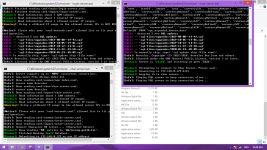
@anacondaq wow! thank you for answering our questions and keeping us updated..your the best. god bless 

 
Last edited by a moderator:
How to make to change the rate of the server and how to make it 255/120 max level?

Do I need to recompile it if I change the max level and exp rate?

 
HI.. CAN I DOWNLOAD THIS FILES VIA IDM? TRY TO COPY THE LINK BUT ITS SEEM CAN'T BE READ. I'D DOWNLOADED MULTIPLE TIMES USING CHROMES BUT AT THE END IT WAS FAILED. 

 
Back
Top