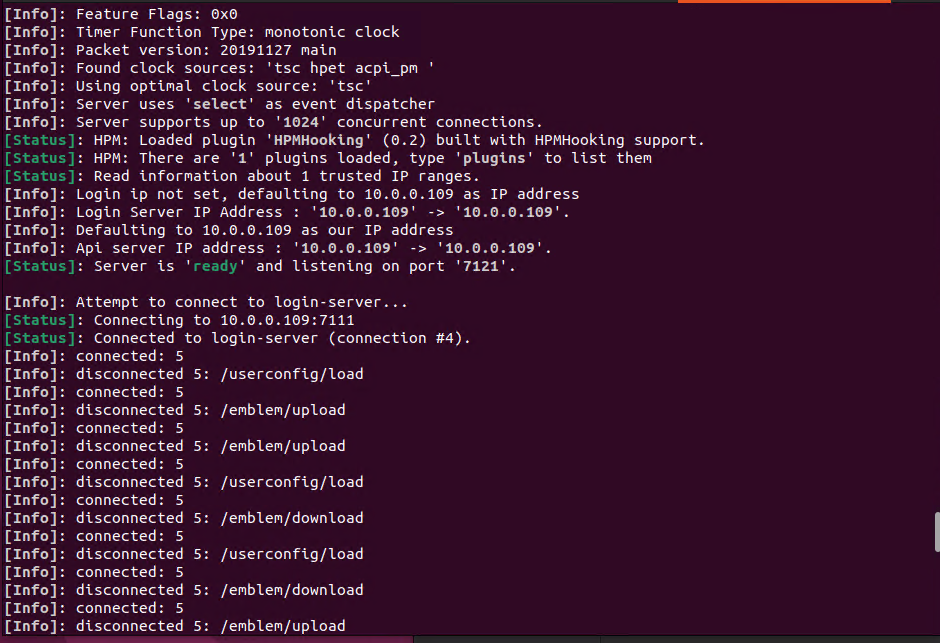
I'm attempting to get our Guild Emblems working on an 20191127 client. I edited ExternalSettings_kr.lub, putting my IP and port into "AssistAddr =". I opened a port in the firewall and router and assigned it to the api server in api-server.conf and added the login and char server ports. The api server appears to launch fine. I can also load up a Guild Emblem on my end, and have it show correctly. The API Server log only displays
but no emblem appears in game nor is one redownloaded into _TmpEmblem.
I'm at a bit of a loss as to why it's not working, would anyone else know why? (I wasn't sure if this is Client-Side or Server support, please don't beat me)


Hi.
I'm attempting to get our Guild Emblems working on an 20191127 client. I edited ExternalSettings_kr.lub, putting my IP and port into "AssistAddr =". I opened a port in the firewall and router and assigned it to the api server in api-server.conf and added the login and char server ports. The api server appears to launch fine. I can also load up a Guild Emblem on my end, and have it show correctly. The API Server log only displays
[Info]: connected: 5
[Info]: disconnected 5: /emblem/upload
during this process.
However, no one else can see the emblem. When I delete the temporary emblem out of _TmpEmblem, and log back in, I can see the API Server do
[Info]: connected: 5
[Info]: disconnected 5: /emblem/download
but no emblem appears in game nor is one redownloaded into _TmpEmblem.
I'm at a bit of a loss as to why it's not working, would anyone else know why? (I wasn't sure if this is Client-Side or Server support, please don't beat me)
AssistAddr = "108.X.X.X:7121"
-----------------------------------------
-- Old client compatibility [Secret]
-- (Just change the "AssistAddr" to your IP)
-----------------------------------------
Url = { TwitterUrl = 'http://'..AssistAddr }
AccountLinkedUserDataUrl = {
	Save = 'http://'..AssistAddr..'/userconfig/save',
	Load = 'http://'..AssistAddr..'/userconfig/load'
}
TwitterDataUrl = {
	Auth = 'http://'..AssistAddr..'/twitter/user-auth',
	Upload = 'http://'..AssistAddr..'/twitter/upload'
}
EmblemDataUrl = {
	Upload = 'http://'..AssistAddr..'/emblem/upload',
	Download = 'http://'..AssistAddr..'/emblem/download'
}
Thanks!
Edited by notrankinShare this post
Link to post
Share on other sites