Jump to content
  • 0
wabbuwabbu

FluxCP - Connection Refused

Question

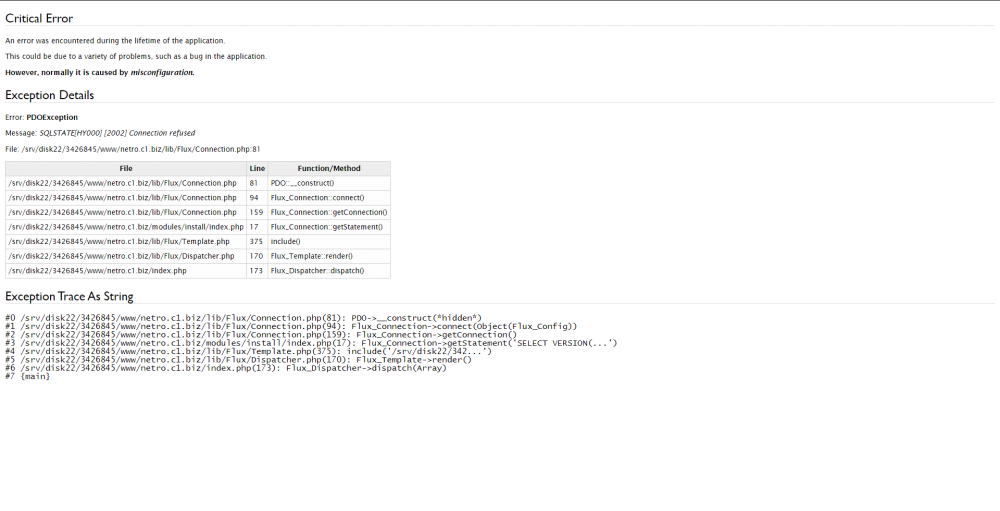
I’m having trouble connecting FluxCP to my server.

1498114508_Sinttulo.thumb.png.1999b151cbd4a4fd4e8d1cf6e81aa7b9.png


I have an independent host for the website (FluxCP) and then I’m running my ragnarok server through a Raspberry PI, utilizing my Public IP address.

I can’t seem to connect my server.php properly.
This is how I got my server.php setup:

<?php
return array(
	// Example server configuration. You may have more arrays like this one to
	// specify multiple server groups (however they should share the same login
	// server whilst they are allowed to have multiple char/map pairs).
	array(
		'ServerName'     => 'NetRO',
		// Global database configuration (excludes logs database configuration).
		'DbConfig'       => array(
			//'Socket'     => '/tmp/mysql.sock',
			//'Port'       => 3306,  
			//'Encoding'   => 'utf8', // Connection encoding -- use whatever here your MySQL tables collation is.
			'Convert'    => 'utf8',
				// -- 'Convert' option only works when 'Encoding' option is specified and iconv (http://php.net/iconv) is available.
				// -- It specifies the encoding to convert your MySQL data to on the website (most likely needs to be utf8)
			'Hostname'   => '192.168.1.38',  // Raspberry PI's Local IP
			'Username'   => 'hercrodbusr',
			'Password'   => 'Password',
			'Database'   => 'hercrodb',
			'Persistent' => true,
			'Timezone'   => null // Example: '+0:00' is UTC.
			// The possible values of 'Timezone' is as documented from the MySQL website:
			// "The value can be given as a string indicating an offset from UTC, such as '+10:00' or '-6:00'."
			// "The value can be given as a named time zone, such as 'Europe/Helsinki', 'US/Eastern', or 'MET'." (see below continuation!)
			// **"Named time zones can be used only if the time zone information tables in the mysql database have been created and populated."
		),
		// This is kept separate because many people choose to have their logs
		// database accessible under different credentials, and often on a
		// different server entirely to ensure the reliability of the log data.
		'LogsDbConfig'   => array(
			//'Socket'     => '/tmp/mysql.sock',
			//'Port'       => 3306,
			//'Encoding'   => null, // Connection encoding -- use whatever here your MySQL tables collation is.
			'Convert'    => 'utf8',
				// -- 'Convert' option only works when 'Encoding' option is specified and iconv (http://php.net/iconv) is available.
				// -- It specifies the encoding to convert your MySQL data to on the website (most likely needs to be utf8)
			'Hostname'   => '192.168.1.38', // Raspberry PI's Local IP
			'Username'   => 'hercrodbusr',
			'Password'   => 'Password',
			'Database'   => 'hercrodb',
			'Persistent' => true,
			'Timezone'   => null // Possible values is as described in the comment in DbConfig.
		),
		// Login server configuration.
		'LoginServer'    => array(
			'Address'  => 'Public_IP',
			'Port'     => 6900,
			'UseMD5'   => true,
			'NoCase'   => true, // Hercules account case-sensitivity; Default: Case-INsensitive (true).
			'GroupID'  => 0,    // Default account group ID during registration.
			//'Database' => 'ragnarok'
		),
		'CharMapServers' => array(
			array(
				'ServerName'      => 'NetRO',
				'Renewal'         => true,
				'MaxCharSlots'    => 9,
				'DateTimezone'    => null, // Specifies game server's timezone for this char/map pair. (See: http://php.net/timezones)
				//'ResetDenyMaps'   => 'sec_pri', // Defaults to 'sec_pri'. This value can be an array of map names.
				//'Database'        => 'ragnarok', // Defaults to DbConfig.Database
				'MaxBaseLevel'    => 150,
				'ExpRates' => array(
					'Base'        => 100, // Rate at which (base) exp is given
					'Job'         => 100, // Rate at which job exp is given
					'Mvp'         => 100  // MVP bonus exp rate
				),
				'DropRates' => array(
					// The rate the common items (in the ETC tab, besides card) are dropped
					'Common'      => 100,
					'CommonBoss'  => 100,
					// The rate healing items (that restore HP or SP) are dropped
					'Heal'        => 100,
					'HealBoss'    => 100,
					// The rate usable items (in the item tab other then healing items) are dropped
					'Useable'     => 100,
					'UseableBoss' => 100,
					// The rate at which equipment is dropped
					'Equip'       => 100,
					'EquipBoss'   => 100,
					// The rate at which cards are dropped
					'Card'        => 100,
					'CardBoss'    => 100,
					// The rate adjustment for the MVP items that the MVP gets directly in their inventory
					'MvpItem'     => 100
				),
				'CharServer'      => array(
					'Address'     => 'Public_IP',
					'Port'        => 6121
				),
				'MapServer'       => array(
					'Address'     => 'Public_IP',
					'Port'        => 5121
				),
				// -- WoE days and times --
				// First parameter: Starding day 0=Sunday / 1=Monday / 2=Tuesday / 3=Wednesday / 4=Thursday / 5=Friday / 6=Saturday
				// Second parameter: Starting hour in 24-hr format.
				// Third paramter: Ending day (possible value is same as starting day).
				// Fourth (final) parameter: Ending hour in 24-hr format.
				// ** (Note, invalid times are ignored silently.)
				'WoeDayTimes'   => array(
					//array(0, '12:00', 0, '14:00'), // Example: Starts Sunday 12:00 PM and ends Sunday 2:00 PM
					//array(3, '14:00', 3, '15:00')  // Example: Starts Wednesday 2:00 PM and ends Wednesday 3:00 PM
				),
				// Modules and/or actions to disallow access to during WoE.
				'WoeDisallow'   => array(
					array('module' => 'character', 'action' => 'online'),  // Disallow access to "Who's Online" page during WoE.
					array('module' => 'character', 'action' => 'mapstats') // Disallow access to "Map Statistics" page during WoE.
				)
			)
		)
	)
);
?>


I’ve enabled the ports 6900, 5121, 6121 and 3306 (MySQL) from my rooter and also applied them to the firewall exception in the raspberry pi. Following this method, I managed to run all the ports except 3303. 

Screen_Shot_2020-05-07_at_15_58_48.png.f2ca496ac3e2df62252ec03dffab997e.png

Screen_Shot_2020-05-07_at_16_00_43.png.80d7147115085d059b073db9e28b4a9a.png


Also, I would like to point out that I activated the DMZ on my Raspberry PI, but I still get the same error error SQLSTATE[HY000] [2002] Connection refused.


Edit: This is how I created the Mysql data base in the Raspberry PI:
 

Quote

DROP DATABASE IF EXISTS hercrodb; CREATE DATABASE IF NOT EXISTS hercrodb DEFAULT CHARACTER SET utf8 COLLATE utf8_general_ci; DROP DATABASE IF EXISTS hercrolog; CREATE DATABASE IF NOT EXISTS hercrolog DEFAULT CHARACTER SET utf8 COLLATE utf8_general_ci; GRANT SELECT,INSERT,UPDATE,DELETE ON hercrodb.* TO 'hercrodbusr'@'localhost' IDENTIFIED BY '[YOUR_HERCRODBUSR_PASSWORD]'; GRANT SELECT,INSERT ON hercrolog.* TO 'hercrodbusr'@'localhost'; FLUSH PRIVILEGES;


28679651_ScreenShot2020-05-08at01_24_31.png.c1a72be0ca95df3305d081e205a21ba4.png


Same names, only thing I changed was the password.
 

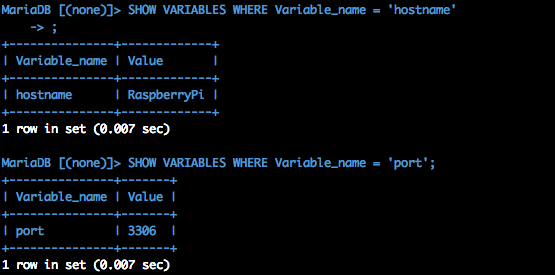
I tried changing the hostname to 'RaspberryPi'
1436844418_ScreenShot2020-05-08at01_45_52.png.fd4f9122d152caaafdeb99ca8b4e43dc.png


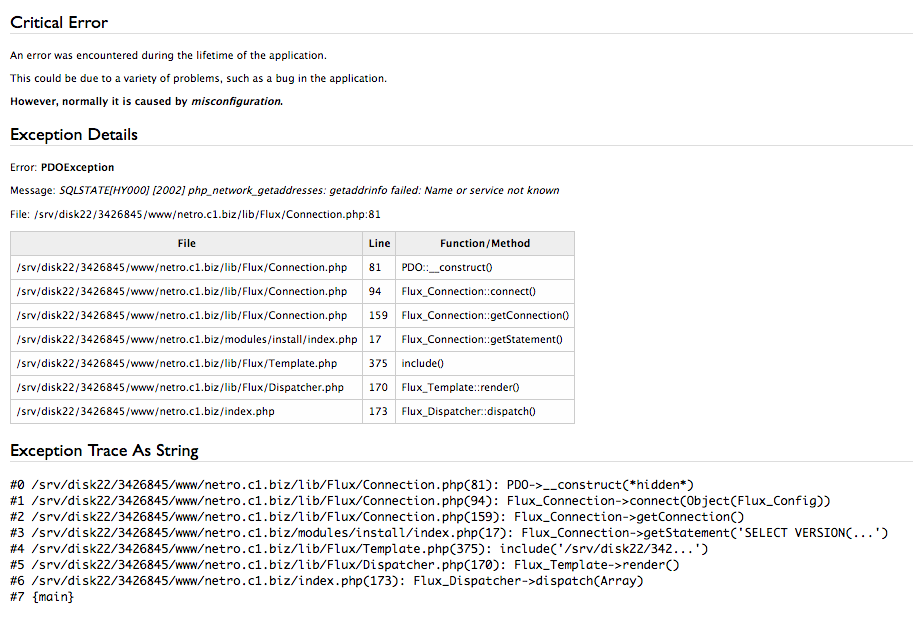
But the error changes to: SQLSTATE[HY000] [2002] php_network_getaddresses: getaddrinfo failed: Name or service not known

679602350_ScreenShot2020-05-08at01_49_08.png.73df26da638350aba6e3e4b84a59778e.png

Edited by wabbuwabbu

Share this post


Link to post
Share on other sites

7 answers to this question

Recommended Posts

  • 0

If u using a website outside ur local network u have to use ur public ip address. U can find on https://whatsmyip.com and this u need to add to ur Flux Config. But maybe ur IP Address changes some times therefore it's better to configure a dyndns server at ur router. Then u can insert ur dns instead of ur ip.


And on ur router u need to allow incoming connection to port 3306 (MySQL port) and for the ip of ur Webserver (cause of security).


U need to change the access of the database to "%" (any host) and on the configuration u need to allow external access.


Best regards,

Rynbef~

Share this post


Link to post
Share on other sites
  • 0
28 minutes ago, Rynbef said:

If u using a website outside ur local network u have to use ur public ip address. U can find on https://whatsmyip.com and this u need to add to ur Flux Config. But maybe ur IP Address changes some times therefore it's better to configure a dyndns server at ur router. Then u can insert ur dns instead of ur ip.


And on ur router u need to allow incoming connection to port 3306 (MySQL port) and for the ip of ur Webserver (cause of security).


U need to change the access of the database to "%" (any host) and on the configuration u need to allow external access.


Best regards,

Rynbef~

Thank you for your reply @Rynbef,

In servers.php, I've modified the field '192.168.1.38' to the Public IP. My idea is to make it work with the public IP first, and eventually change to a static IP.


Router ports are open. Although for some reason, in the port checker it says that the port 3306 is closed. 


58343016_Sinttulo.png.5af50ba0c2ae5c9171f1b66c322d73a9.png


Database access is modified by following this commands:
 

use mysql;
update user set host='%' where User='hercrodbusr';
flush privileges;
quit


28679651_ScreenShot2020-05-08at01_24_31.png.c1a72be0ca95df3305d081e205a21ba4.png.01d97adaab3be501d112447355dd7165.png


Sadly, I'm still getting SQLSTATE[HY000] [2002] Connection refused


80479178_Sinttulo.thumb.png.fab12625676ed6f7d91baa6c7a9098ed.png


Edit: I found in Hercules/conf/global/sql_connection.conf
 

sql_connection: {
	// [INTER] You can specify the codepage to use in your mySQL tables here.
	// (Note that this feature requires MySQL 4.1+)
	//default_codepage: ""

	// [LOGIN] Is `userid` in account_db case sensitive?
	//case_sensitive: false

	// For IPs, ideally under linux, you want to use localhost instead of 127.0.0.1.
	// Under windows, you want to use 127.0.0.1.  If you see a message like
	// "Can't connect to local MySQL server through socket '/tmp/mysql.sock' (2)"
	// and you have localhost, switch it to 127.0.0.1
	db_hostname: "localhost"
	db_port: 3306
	db_username: "hercrodbusr"
	db_password: "Password"
	db_database: "hercrodb"
	//codepage:""
}

I've tried changing the db_hostname to the public IP. But when I restarted the ragnarok server it gave me a sql warning saying that it can't connect to MySQL server on "__My_PublicIP__" (115)

Edited by wabbuwabbu

Share this post


Link to post
Share on other sites
  • 0

I had this once too. Problem was my webhost's firewall and some other security settings they had to adjust for me (it was a shared webhosting plan), e.g. allowing connections from outside and whitelist some stuff for mod_security 

Share this post


Link to post
Share on other sites
  • 0
5 hours ago, Ridley said:

I had this once too. Problem was my webhost's firewall and some other security settings they had to adjust for me (it was a shared webhosting plan), e.g. allowing connections from outside and whitelist some stuff for mod_security 

Hello @Ridley, thank you for the help.


I've spoken to the host provider and in their side the ports seem to be opened.


Wanting to see what's wrong with my MarianDB configuration y decided to go to:
 

sudo nano /etc/mysql/mariadb.conf.d/50-server.cnf

To modify the bind-address from 127.0.0.1 to 0.0.0.0

Then I restarted the service using:

sudo systemctl restart mysql.service
sudo systemctl restart mariadb.service


Next step I could think of is to run a netcast to see the port 3306. This is what I found:

1778435706_ScreenShot2020-05-08at15_05_31.thumb.png.74e3729153325e99dae8d10b1c256be4.png


Good news is that the 3306 port seems to be opened and working.

1261289597_ScreenShot2020-05-08at15_20_36.png.f4ebb237c738bba71e76aeee0255eec8.png

The bad news is that I'm getting SQLSTATE[HY000] [2002] Connection refused


So the problem, I'm guessing its something related to the configuration in 844/./map-server and 842/./login-server.
Problem is that I don't exactly know how to access this aboved described destinations.

Edited by wabbuwabbu

Share this post


Link to post
Share on other sites
  • 0

Change the Bind Address from 0.0.0.0 to ur public address and remove "skip-networking" or comment it out.


Cause the port is open but MySQL refuse the connection from external if u dont change it like I told u (on top of this answer).


Rynbef~

Edited by Rynbef

Share this post


Link to post
Share on other sites
  • 0
29 minutes ago, Rynbef said:

Change the Bind Address from 0.0.0.0 to ur public address and remove "skip-networking" or comment it out.


Rynbef~

Modifying the Bind-Address to the Public IP gives me an error in the server when it restarts:
 

[SQL]: Access denied for user 'hercrodbusr'@'%' to database 'hercrolog'


[Notice]: Connection of the char-server 'NetRO' REFUSED.
[Error]: Sent wrong packet id: 0x2711
[Error]: --- failed assertion --------------------------------------------
[Error]: socket.c:2112: '0' in function `socket_validateWfifo'
[Error]: 0x2be67 nullpo_backtrace_print
[Error]: 	/home/inty/Hercules/src/common/nullpo.c:77
[Error]: 0x2be67 assert_report
[Error]: 	/home/inty/Hercules/src/common/nullpo.c:147
[Error]: 0x3e3cf socket_validateWfifo
[Error]: 	/home/inty/Hercules/src/common/socket.c:2112
[Error]: 0x40c7f wfifoset
[Error]: 	/home/inty/Hercules/src/common/socket.c:901
[Error]: 0x40c7f wfifoset
[Error]: 	/home/inty/Hercules/src/common/socket.c:855
[Error]: 0x1efbb login_parse_request_connection
[Error]: 	/home/inty/Hercules/src/login/login.c:1473
[Error]: 0x19e7b lclif_parse_CA_CHARSERVERCONNECT
[Error]: 	/home/inty/Hercules/src/login/lclif.c:266
[Error]: 0x1a2f7 lclif_parse_packet
[Error]: 	/home/inty/Hercules/src/login/lclif.c:510
[Error]: 0x19f33 lclif_parse
[Error]: 	/home/inty/Hercules/src/login/lclif.c:419
[Error]: 0x404d7 do_sockets
[Error]: 	/home/inty/Hercules/src/common/socket.c:1073
[Error]: 0x1575f main
[Error]: 	/home/inty/Hercules/src/common/core.c:539
[Error]: 0x76c59717 ???
[Error]: 	???:0
[Error]: --- end failed assertion ----------------------------------------
[Error]: Can not connect to login-server.
[Error]: The server communication passwords (default s1/p1) are probably invalid.
[Error]: Also, please make sure your login db has the correct communication username/passwords and the gender of the account is S.
[Error]: The communication passwords are set in /conf/map/map-server.conf and /conf/char/char-server.conf


Edited by wabbuwabbu

Share this post


Link to post
Share on other sites
  • 0

But now the connection to the MySQL server works and it don't getting refused. U need to create a user and allow connection from any host (remote/external too) and it should works fine.


The src code error will removed after the connection is correct.


Rynbef~

Share this post


Link to post
Share on other sites
  • 0

If the problem is persist behind all they instruct. the last is Disable your SELinux ^_^

Share this post


Link to post
Share on other sites

Please sign in to comment

You will be able to leave a comment after signing in


Sign In Now

×
×
  • Create New...

Important Information

By using this site, you agree to our Terms of Use.