




-
Featured Topics
-
-
Latest Commits
-
Topics
-
-
Posts
-
.thumb.jpg.fdf0a6bf9ace287d9dba931213558ad7.jpg) current work in progress websites:
current work in progress websites: -
 Work: 10/10 Support: 10/10 Price: 11/10 Recommendation = 100%!
 -
hello! i've decided to return to the ro scene and will be offering graphic services again soon. my plan is to get my website back up and running and start selling affordable premades. once everything is set up, i'll also be accepting custom requests! feel free to join my discord server for updates, freebies, and future releases. ♡
-
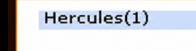
View File Display Online Player Count in Server List Name Overview This patch displays the current online player/s count directly in each server name shown on the server selection screen. Instead of showing only the configured server name: Hercules Players will see: Hercules(123) Where 123 is the live online count reported by the login server, including auto traders and vending characters. Features Displays live online population in the server list Updates automatically whenever the login server sends the server list Includes auto traders in the count No client-side modifications required Fully compatible with standard Ragnarok clients Existing population color indicators remain unchanged Notes Server names are limited to 20 characters. When the online count is appended, very long server names may be truncated by the client. The existing server population color indicator is preserved. Only the displayed name is modified; no networking or packet structures are changed. Submitter Mirage Submitted 05/30/26 Category Source Modifications
-
By naruto10890 · Posted
About My Services DESCRIPTION ROOverlay is a professional overlay injected directly into your RO client via WARP. No game file modifications required — just copy the DLL and register it in DLLSpec.yml. Compatible with DirectDraw 7, Direct3D 8 and Direct3D 9. Confirmed working on 2018-06-21 Ragexe client. FEATURES - Real-time FPS, Ping (ms) and ICMP Packet loss % - Automatic map name and X/Y coordinates (read from game packets) - Discord Rich Presence — map, character, class and server logo - Custom splash screen at game launch (BMP, JPG, PNG) - VSync, Gamma correction, FPS Cap - Anisotropic filtering and Anti-aliasing MSAA (Direct3D 9) - FPS and Ping alert — overlay blinks when threshold is crossed - System clock and session timer - Server name display - Hotkey to toggle overlay on/off (Alt+F12, configurable) - Visual configurator included — changes apply live LICENSING Each DLL is compiled exclusively for your server IP. Cannot be shared, transferred or resold. License valid for 1 year per server. REQUIREMENTS - WARP configured to load custom DLLs - Packet Obfuscation must be DISABLED in WARP - Add to DLLSpec.yml: - Name: ROOverlay.dll Funcs: - Name: "ROOverlay_Version" PRICING - Annual license (1 server, forever): $40 USD - Launch price — first 5 clients: $25 USD Payment via PayPal Friends & Family. Non-refundable. WHAT YOU RECEIVE - ROOverlay.dll — compiled for your server IP - ROOverlayConfig.exe — visual configurator - Discord images folder — job/class images for Discord RPC - Instructions.txt — full setup guide (English and Spanish) CONTACT Discord: https://discord.gg/MeHKEDgnJA FAQ Does it work with clients other than 2018? Confirmed on 2018-06-21 Ragexe. Other versions may work — contact us first. Can I use it on multiple servers? No. Each license is tied to one server IP. Additional servers need a separate license. Does Discord RPC require Discord open? Yes, only that feature requires Discord running. The overlay always works regardless. How long does delivery take? Usually within a few hours after payment confirmation.
-
-
Download Statistics
-
Files467
-
Comments167
-
Reviews239
-


.thumb.jpg.fdf0a6bf9ace287d9dba931213558ad7.jpg)